CSS Inheritance, The Cascade And Global Scope: Your New Old Worst Best Friends

Mike's Notes

An interesting article in Smashing Magazine about CSS.

Resources

References

  • Reference

Repository

  • Home > Ajabbi Research > Library >
  • Home > Handbook > 

Last Updated

17/05/2025

CSS Inheritance, The Cascade And Global Scope: Your New Old Worst Best Friends

By: Heydon Pickering
Smashing Magazine: 21/11/2016

Quick Summary

If you don’t want your design to look like it’s made out of unrelated things, this article is for you. There is already a technology, called CSS, which is designed specifically to solve this problem. Using CSS, you can propagate styles that cross the borders of your HTML components, ensuring a consistent design with minimal effort. Today, Heydon Pickering is going to revisit inheritance, the cascade and scope here with respect to modular interface design. He aims to show you how to leverage these features so that your CSS code becomes more concise and self-regulating, and your interface more easily extensible.

I’m big on modular design. I’ve long been sold on dividing websites into components, not pages, and amalgamating those components dynamically into interfaces. Flexibility, efficiency and maintainability abound.

But I don’t want my design to look like it’s made out of unrelated things. I’m making an interface, not a surrealist photomontage. As luck would have it, there is already a technology, called CSS, which is designed specifically to solve this problem. Using CSS, I can propagate styles that cross the borders of my HTML components, ensuring a consistent design with minimal effort.

  • inheritance,
  • the cascade (the “C” in CSS).

Despite these features enabling a DRY, efficient way to style web documents and despite them being the very reason CSS exists, they have fallen remarkably out of favor. From CSS methodologies such as BEM and Atomic CSS through to programmatically encapsulated CSS modules, many are doing their best to sidestep or otherwise suppress these features. This gives developers more control over their CSS, but only an autocratic sort of control based on frequent intervention.

I’m going to revisit inheritance, the cascade and scope here with respect to modular interface design. I aim to show you how to leverage these features so that your CSS code becomes more concise and self-regulating, and your interface more easily extensible.

Inheritance And font-family #

Despite protestations by many, CSS does not only provide a global scope. If it did, everything would look exactly the same. Instead, CSS has a global scope and a local scope. Just as in JavaScript, the local scope has access to the parent and global scope. In CSS, this facilitates inheritance.

For instance, if I apply a font-family declaration to the root (read: global) html element, I can ensure that this rule applies to all ancestor elements within the document (with a few exceptions, to be addressed in the next section).

html {
  font-family: sans-serif;
}
/*
This rule is not needed ↷
p {
  font-family: sans-serif;
}
*/

Just like in JavaScript, if I declare something within the local scope, it is not available to the global — or, indeed, any ancestral — scope, but it is available to the child scope (elements within p). In the next example, the line-height of 1.5 is not adopted by the html element. However, the a element inside the p does respect the line-height value.

html {
  font-family: sans-serif;
}
p {
  line-height: 1.5;
}
/*

This rule is not needed ↷

p a {
  line-height: 1.5;
}
*/

The great thing about inheritance is that you can establish the basis for a consistent visual design with very little code. And these styles will even apply to HTML you have yet to write. Talk about future-proof!

The Alternative #

There are other ways to apply common styles, of course. For example, I could create a .sans-serif class…

.sans-serif {
  font-family: sans-serif;
}

… and apply it to any element that I feel should have that style:

<p class="sans-serif">Lorem ipsum.</p>

This affords me some control: I can pick and choose exactly which elements take this style and which don’t.

Any opportunity for control is seductive, but there are clear issues. Not only do I have to manually apply the class to any element that should take it (which means knowing what the class is to begin with), but in this case I’ve effectively forgone the possibility of supporting dynamic content: Neither WYSIWYG editors nor Markdown parsers provide sans-serif classes to arbitrary p elements by default.

That class=“sans-serif” is not such a distant relative of style=“font-family: sans-serif” — except that the former means adding code to both the style sheet and the HTML. Using inheritance, we can do less of one and none of the other. Instead of writing out classes for each font style, we can just apply any we want to the html element in one declaration:

html {
  font-size: 125%;
  font-family: sans-serif;
  line-height: 1.5;
  color: #222;
}

The inherit Keyword #

Some types of properties are not inherited by default, and some elements do not inherit some properties. But you can use [property name]: inherit to force inheritance in some cases.

For example, the input element doesn’t inherit any of the font properties in the previous example. Nor does textarea. In order to make sure all elements inherit these properties from the global scope, I can use the universal selector and the inherit keyword. This way, I get the most mileage from inheritance.

* {
  font-family: inherit;
  line-height: inherit;
  color: inherit;
}
html {
  font-size: 125%;
  font-family: sans-serif;
  line-height: 1.5;
  color: #222;
}

Note that I’ve omitted font-size. I don’t want font-size to be inherited directly because it would override user-agent styles for heading elements, the small element and others. This way, I save a line of code and can defer to user-agent styles if I should want.

Another property I would not want to inherit is font-style: I don’t want to unset the italicization of ems just to code it back in again. That would be wasted work and result in more code than I need.

Now, everything either inherits or is forced to inherit the font styles I want them to. We’ve gone a long way to propagating a consistent brand, project-wide, with just two declaration blocks. From this point onwards, no developer has to even think about font-family, line-height or color while constructing components, unless they are making exceptions. This is where the cascade comes in.

Exceptions-Based Styling #

I’ll probably want my main heading to adopt the same font-family, color and possibly line-height. That’s taken care of using inheritance. But I’ll want its font-size to differ. Because the user agent already provides an enlarged font-size for h1 elements (and it will be relative to the 125% base font size I’ve set), it’s possible I don’t need to do anything here.

However, should I want to tweak the font size of any element, I can. I take advantage of the global scope and only tweak what I need to in the local scope.

* {
  font-family: inherit;
  line-height: inherit;
  color: inherit;
}
html {
  font-size: 125%;
  font-family: sans-serif;
  line-height: 1.5;
  color: #222;
}
h1 {
  font-size: 3rem;
}

If the styles of CSS elements were encapsulated by default, this would not be possible: I’d have to add all of the font styles to h1 explicitly. Alternatively, I could divide my styles up into separate classes and apply each to the h1 as a space-separated value:

<h1 class="Ff(sans) Fs(3) Lh(1point5) C(darkGrey)">Hello World</h1>

Either way, it’s more work and a styled h1 would be the only outcome. Using the cascade, I’ve styled most elements the way I want them, with h1 just as a special case, just in one regard. The cascade works as a filter, meaning styles are only ever stated where they add something new.

Element Styles #

We’ve made a good start, but to really leverage the cascade, we should be styling as many common elements as possible. Why? Because our compound components will be made of individual HTML elements, and a screen-reader-accessible interface makes the most of semantic markup.

To put it another way, the style of “atoms” that make up your interface “molecules” (to use atomic design terminology) should be largely addressable using element selectors. Element selectors are low in specificity, so they won’t override any class-based styles you might incorporate later.

The first thing you should do is style all of the elements that you know you’re going to need:

a { … }
p { … }
h1, h2, h3 { … }
input, textarea { … }
/* etc */
The next part is crucial if you want a consistent interface without redundancy: Each time you come to creating a new component, if it introduces new elements, style those new elements with element selectors. Now is not the time to introduce restrictive, high-specificity selectors. Nor is there any need to compose a class. Semantic elements are what they are.

For example, if I’ve yet to style button elements (as in the previous example) and my new component incorporates a button element, this is my opportunity to style button elements for the entire interface.

button {
  padding: 0.75em;
  background: #008;
  color: #fff;
}
button:focus {
  outline: 0.25em solid #dd0;
}

Now, when you come to write a new component that also happens to incorporate buttons, that’s one less thing to worry about. You’re not rewriting the same CSS under a different namespace, and there’s no class name to remember or write either. CSS should always aim to be this effortless and efficient — it’s designed for it.

Using element selectors has three main advantages:

  • The resulting HTML is less verbose (no redundant classes).
  • The resulting style sheet is less verbose (styles are shared between components, not rewritten per component).
  • The resulting styled interface is based on semantic HTML.

The use of classes to exclusively provide styles is often defended as a “separation of concerns.” This is to misunderstand the W3C’s separation of concerns principle. The objective is to describe structure with HTML and style with CSS. Because classes are designated exclusively for styling purposes and they appear within the markup, you are technically breaking with separation wherever they’re used. You have to change the nature of the structure to elicit the style.

Wherever you don’t rely on presentational markup (classes, inline styles), your CSS is compatible with generic structural and semantic conventions. This makes it trivial to extend content and functionality without it also becoming a styling task. It also makes your CSS more reusable across different projects where conventional semantic structures are employed (but where CSS ‘methodologies’ may differ).

Special Cases #

Before anyone accuses me of being simplistic, I’m aware that not all buttons in your interface are going to do the same thing. I’m also aware that buttons that do different things should probably look different in some way.

But that’s not to say we need to defer to classes, inheritance or the cascade. To make buttons found in one interface look fundamentally dissimilar is to confound your users. For the sake of accessibility and consistency, most buttons only need to differ in appearance by label.

<button>create</button>
<button>edit</button>
<button>delete</button>


Remember that style is not the only visual differentiator. Content also differentiates visually — and in a way that is much less ambiguous. You’re literally spelling out what different things are for.

There are fewer instances than you might imagine where using style alone to differentiate content is necessary or appropriate. Usually, style differences should be supplemental, such as a red background or a pictographic icon accompanying a textual label. The presence of textual labels are of particular utility to those using voice-activation software: Saying “red button” or “button with cross icon” is not likely to elicit recognition by the software.

I’ll cover the topic of adding nuances to otherwise similar looking elements in the “Utility Classes” section to follow.

Attributes #

Semantic HTML isn’t just about elements. Attributes define types, properties and states. These too are important for accessibility, so they need to be in the HTML where applicable. And because they’re in the HTML, they provide additional opportunities for styling hooks.

For example, the input element takes a type attribute, should you want to take advantage of it, and also attributes such as aria-invalid to describe state.

input, textarea {
  border: 2px solid;
  padding: 0.5rem;
}
[aria-invalid] {
  border-color: #c00;
  padding-right: 1.5rem;
  background: url(images/cross.svg) no-repeat center 0.5em;
}

A few things to note here:

I don’t need to set color, font-family or line-height here because these are inherited from html, thanks to my use of the inherit keyword. If I want to change the main font-family used application-wide, I only need to edit the one declaration in the html block.

The border color is linked to color, so it too inherits the global color. All I need to declare is the border’s width and style.

The [aria-invalid] attribute selector is unqualified. This means it has better reach (it can be used with both my input and textarea selectors) and it has minimal specificity. Simple attribute selectors have the same specificity as classes. Using them unqualified means that any classes written further down the cascade will override them as intended.

The BEM methodology would solve this by applying a modifier class, such as input–invalid. But considering that the invalid state should only apply where it is communicated accessibly, input–invalid is necessarily redundant. In other words, the aria-invalid attribute has to be there, so what’s the point of the class?

Just Write HTML #

My absolute favorite thing about making the most of element and attribute selectors high up in the cascade is this: The composition of new components becomes less a matter of knowing the company or organization’s naming conventions and more a matter of knowing HTML. Any developer versed in writing decent HTML who is assigned to the project will benefit from inheriting styling that’s already been put in place. This dramatically reduces the need to refer to documentation or write new CSS. For the most part, they can just write the (meta) language that they should know by rote. Tim Baxter also makes a case for this in Meaningful CSS: Style It Like You Mean It.

Layout #

So far, we’ve not written any component-specific CSS, but that’s not to say we haven’t styled anything. All components are compositions of HTML elements. It’s largely in the order and arrangement of these elements that more complex components form their identity.

Which brings us to layout.

Principally, we need to deal with flow layout — the spacing of successive block elements. You may have noticed that I haven’t set any margins on any of my elements so far. That’s because margin should not be considered a property of elements but a property of the context of elements. That is, they should only come into play where elements meet.

Fortunately, the adjacent sibling combinator can describe exactly this relationship. Harnessing the cascade, we can instate a uniform default across all block-level elements that appear in succession, with just a few exceptions.

* {
  margin: 0;
}
* + * {
  margin-top: 1.5em;
}
body, br, li, dt, dd, th, td, option {
  margin-top: 0;
}

The use of the extremely low-specificity lobotomized owl selector ensures that any elements (except the common exceptions) are spaced by one line. This means that there is default white space in all cases, and developers writing component flow content will have a reasonable starting point.

In most cases, margins now take care of themselves. But because of the low specificity, it’s easy to override this basic one-line spacing where needed. For example, I might want to close the gap between labels and their respective fields, to show they are paired. In the following example, any element that follows a label (input, textarea, select, etc.) closes the gap.

label {
  display: block
}
label + * {
  margin-top: 0.5rem;
}

Once again, using the cascade means only having to write specific styles where necessary. Everything else conforms to a sensible baseline.

Note that, because margins only appear between elements, they don’t double up with any padding that may have been included for the container. That’s one more thing not to have to worry about or code defensively against.

Also, note that you get the same spacing whether or not you decide to include wrapper elements. That is, you can do the following and achieve the same layout — it’s just that the margins emerge between the divs rather than between labels following inputs.

<form>
  <div>
    <label for="one">Label one</label>
    <input id="one" name="one" type="text">
  </div>
  <div>
    <label for="two">Label two</label>
    <input id="two" name="two" type="text">
  </div>
  <button type="submit">Submit</button>
</form>

Achieving the same result with a methodology such as atomic CSS would mean composing specific margin-related classes and applying them manually in each case, including for first-child exceptions handled implicitly by * + *:

<form class="Mtop(1point5)">
  <div class="Mtop(0)">
    <label for="one" class="Mtop(0)">Label one</label>
    <input id="one" name="one" type="text" class="Mtop(0point75)">
  </div>
  <div class="Mtop(1point5)">
    <label for="two" class="Mtop(0)">Label two</label>
    <input id="two" name="two" type="text" class="Mtop(0point75)">
  </div>
  <button type="submit" class="Mtop(1point5)">Submit</button>
</form>

Bear in mind that this would only cover top margins if one is adhering to atomic CSS. You’d have to prescribe individual classes for color, background-color and a host of other properties, because atomic CSS does not leverage inheritance or element selectors.

<form class="Mtop(1point5) Bdc(#ccc) P(1point5)">
  <div class="Mtop(0)">
    <label for="one" class="Mtop(0) C(brandColor) Fs(bold)">Label one</label>
    <input id="one" name="one" type="text" class="Mtop(0point75) C(brandColor) Bdc(#fff) B(2) P(1)">
  </div>
  <div class="Mtop(1point5)">
    <label for="two" class="Mtop(0) C(brandColor) Fs(bold)">Label two</label>
    <input id="two" name="two" type="text" class="Mtop(0point75) C(brandColor) Bdc(#fff) B(2) P(1)">
  </div>
  <button type="submit" class="Mtop(1point5) C(#fff) Bdc(blue) P(1)">Submit</button>
</form>
Atomic CSS gives developers direct control over style without deferring completely to inline styles, which are not reusable like classes. By providing classes for individual properties, it reduces the duplication of declarations in the stylesheet.

However, it necessitates direct intervention in the markup to achieve these ends. This requires learning and being commiting to its verbose API, as well as having to write a lot of additional HTML code.

Instead, by styling arbitrary HTML elements and their spacial relationships, CSS ‘methodology’ becomes largely obsolete. You have the advantage of working with a unified design system, rather than an HTML system with a superimposed styling system to consider and maintain separately.

Anyway, here’s how the structure of our CSS should look with our flow content solution in place:

  1. global (html) styles and enforced inheritance,
  2. flow algorithm and exceptions (using the lobotomized owl selector),
  3. element and attribute styles.

We’ve yet to write a specific component or conceive a CSS class, but a large proportion of our styling is done — that is, if we write our classes in a sensible, reusable fashion.

Utility Classes #

The thing about classes is that they have a global scope: Anywhere they are applied in the HTML, they are affected by the associated CSS. For many, this is seen as a drawback, because two developers working independently could write a class with the same name and negatively affect each other’s work.

CSS modules were recently conceived to remedy this scenario by programmatically generating unique class names tied to their local or component scope.

<!-- my module's button -->
<button class="button_dysuhe027653">Press me</button>

<!-- their module's button -->
<button class="button_hydsth971283">Hit me</button>

Ignoring the superficial ugliness of the generated code, you should be able to see where disparity between independently authored components can easily creep in: Unique identifiers are used to style similar things. The resulting interface will either be inconsistent or be consistent with much greater effort and redundancy.

There’s no reason to treat common elements as unique. You should be styling the type of element, not the instance of the element. Always remember that the term “class” means “type of thing, of which there may be many.” In other words, all classes should be utility classes: reusable globally.

Of course, in this example, a .button class is redundant anyway: we have the button element selector to use instead. But what if it was a special type of button? For instance, we might write a .danger class to indicate that buttons do destructive actions, like deleting data:

.danger {
  background: #c00;
  color: #fff;
}

Because class selectors are higher in specificity than element selectors and of the same specificity as attribute selectors, any rules applied in this way will override the element and attribute rules further up in the style sheet. So, my danger button will appear red with white text, but its other properties — like padding, the focus outline, and the margin applied via the flow algorithm — will remain intact.

<button class="danger">delete</button>

Name clashes may happen, occasionally, if several people are working on the same code base for a long time. But there are ways of avoiding this, like, oh, I don’t know, first doing a text search to check for the existence of the name you are about to take. You never know, someone may have solved the problem you’re addressing already.

Local Scope Utilities #

My favorite thing to do with utility classes is to set them on containers, then use this hook to affect the layout of child elements within. For example, I can quickly code up an evenly spaced, responsive, center-aligned layout for any elements:

.centered {
  text-align: center;
  margin-bottom: -1rem; /* adjusts for leftover bottom margin of children */
}
.centered > * {
  display: inline-block;
  margin: 0 0.5rem 1rem;
}
With this, I can center group list items, buttons, a combination of buttons and links, whatever. That’s thanks to the use of the > * part, which means that any immediate children of .centered will adopt these styles, in this scope, but inherit global and element styles, too.

And I’ve adjusted the margins so that the elements can wrap freely without breaking the vertical rhythm set using the * + * selector above it. It’s a small amount of code that provides a generic, responsive layout solution by setting a local scope for arbitrary elements.

My tiny (93B minified) flexbox-based grid system is essentially just a utility class like this one. It’s highly reusable, and because it employs flex-basis, no breakpoint intervention is needed. I just defer to flexbox’s wrapping algorithm.

.fukol-grid {
  display: flex;
  flex-wrap: wrap;
  margin: -0.5em; /* adjusting for gutters */
}
.fukol-grid > * {
  flex: 1 0 5em; /* The 5em part is the basis (ideal width) */
  margin: 0.5em; /* Half the gutter value */
}

Using BEM, you’d be encouraged to place an explicit “element” class on each grid item:

<div class="fukol"> <!-- the outer container, needed for vertical rhythm -->
  <ul class="fukol-grid">
    <li class="fukol-grid__item"></li>
    <li class="fukol-grid__item"></li>
    <li class="fukol-grid__item"></li>
    <li class="fukol-grid__item"></li>
  </ul>
</div>

But there’s no need. Only one identifier is required to instantiate the local scope. The items here are no more protected from outside influence than the ones in my version, targeted with > * — nor should they be. The only difference is the inflated markup.

So, now we’ve started incorporating classes, but only generically, as they were intended. We’re still not styling complex components independently. Instead, we’re solving system-wide problems in a reusable fashion. Naturally, you will need to document how these classes are used in your comments.

Utility classes like these take advantage of CSS’ global scope, the local scope, inheritance and the cascade simultaneously. The classes can be applied universally; they instantiate the local scope to affect just their child elements; they inherit styles not set here from the parent or global scope; and we’ve not overqualified using element or class selectors.

Here’s how our cascade looks now:

  1. global (html) styles and enforced inheritance,
  2. flow algorithm and exceptions (using the lobotomized owl selector),
  3. element and attribute styles,
  4. generic utility classes.

Of course, there may never be the need to write either of these example utilities. The point is that, if the need does emerge while working on one component, the solution should be made available to all components. Always be thinking in terms of the system.

Component-Specific Styles #

We’ve been styling components, and ways to combine components, from the beginning, so it’s tempting to leave this section blank. But it’s worth stating that any components not created from other components (right down to individual HTML elements) are necessarily over-prescribed. They are to components what IDs are to selectors and risk becoming anachronistic to the system.

In fact, a good exercise is to identify complex components (“molecules,” “organisms”) by ID only and try not to use those IDs in your CSS. For example, you could place #login on your log-in form component. You shouldn’t have to use #login in your CSS with the element, attribute and flow algorithm styles in place, although you might find yourself making one or two generic utility classes that can be used in other form components.

If you do use #login, it can only affect that component. It’s a reminder that you’ve moved away from developing a design system and towards the interminable occupation of merely pushing pixels.

Conclusion #

When I tell folks that I don’t use methodologies such as BEM or tools such as CSS modules, many assume I’m writing CSS like this:

header nav ul li {
  display: inline-block;
}
header nav ul li a {
  background: #008;
}

I don’t. A clear over-specification is present here, and one we should all be careful to avoid. It’s just that BEM (plus OOCSS, SMACSS, atomic CSS, etc.) are not the only ways to avoid convoluted, unmanageable CSS.

In an effort to defeat specificity woes, many methodologies defer almost exclusively to the class selector. The trouble is that this leads to a proliferation of classes: cryptic ciphers that bloat the markup and that — without careful attention to documentation — can confound developers new to the in-house naming system they constitute.

By using classes prolifically, you also maintain a styling system that is largely separate from your HTML system. This misappropriation of ‘separate concerns’ can lead to redundancy or, worse, can encourage inaccessibility: it’s possible to affect a visual style without affecting the accessible state along with it:

<input id="my-text" aria-invalid="false" class="text-input--invalid" />

In place of the extensive writing and prescription of classes, I looked at some other methods:

  • leveraging inheritance to set a precedent for consistency;
  • making the most of element and attribute selectors to support transparent, standards-based composition;
  • applying a code- and labor-saving flow layout system;
  • incorporating a modest set of highly generic utility classes to solve common layout problems affecting multiple elements.

All of these were put in service of creating a design system that should make writing new interface components easier and less reliant on adding new CSS code as a project matures. And this is possible not thanks to strict naming and encapsulation, but thanks to a distinct lack of it.

Even if you’re not comfortable using the specific techniques I’ve recommended here, I hope this article has at least gotten you to rethink what components are. They’re not things you create in isolation. Sometimes, in the case of standard HTML elements, they’re not things you create at all. The more you compose components from components, the more accessible and visually consistent your interface will be, and with less CSS to achieve that end.

There’s not much wrong with CSS. In fact, it’s remarkably good at letting you do a lot with a little. We’re just not taking advantage of that.

2021 Complexity Map

Mike's Notes

A useful diagram from the book Atlas of Social Complexity by Brian Castellani and Lasse Gerrits.

Resources

References

  • Reference

Repository

  • Home > Ajabbi Research > Library >
  • Home > Handbook > 

Last Updated

18/04/2025

2021 Complexity Map

By: Brian Castellani and Lasse Gerrits
Art & Science Factory: 


Storing times for human events

Mike's Notes

Note

Resources

References

  • Reference

Repository

  • Home > Ajabbi Research > Library >
  • Home > Handbook > 

Last Updated

17/05/2025

Storing times for human events

By: Simon Willison
Simon Willison's Webblog: 27/11/2024

I’ve worked on various event websites in the past, and one of the unintuitively difficult problems that inevitably comes up is the best way to store the time that an event is happening. Based on that past experience, here’s my current recommendation.

This is the expanded version of a comment I posted on lobste.rs a few days ago, which ended up attracting a bunch of attention on Twitter.

The problem

  • The “best practice” that isn’t
  • Things that can go wrong
  • User error
  • International timezone shenanigans
  • Microsoft Exchange and the DST update of 2007
  • My recommendation: store the user’s intent time and the location/timezone
  • Timezone UIs suck, generally

The problem #

An event happens on a date, at a time. The precise details of that time are very important: if you tell people to show up to your event at 7pm and it turns out they should have arrived at 6pm they’ll miss an hour of the event!

Some of the worst bugs an events website can have are the ones that result in human beings traveling to a place at a time and finding that the event they came for is not happening at the time they expected.

So how do you store the time of an event?

The “best practice” that isn’t #

Any time you talk to database engineers about dates and times you’re likely to get the same advice: store everything in UTC. Dates and times are complicated enough that the only unambiguous way to store them is in UTC—no daylight savings or timezones to worry about, it records the exact moment since the dawn of the universe at which the event will take place.

Then, when you display those times to users, you can convert them to that user’s current timezone—neatly available these days using the Intl.DateTimeFormat().resolvedOptions().timeZone browser API.

There’s a variant of this advice which you’re more likely to hear from the PostgreSQL faithful: use TIMESTAMP WITH TIME ZONE or its convenient alias timestamptz. This stores the exact value in UTC and sounds like it might store the timezone too... but it doesn’t! All that’s stored is that UTC value, converted from whatever timezone was active or specified when the value was inserted.

In either case, we are losing critical information about when that event is going to happen.

Things that can go wrong #

What’s wrong with calculating the exact UTC time the event is starting and storing only that?

The problem is that we are losing crucial details about the event creator’s original intent.

If I arrange an evening meetup for next year on December 3rd at 6pm, I mean 6pm local time, by whatever definition of local time is active on that particular date.

There are a number of ways this time can end up misinterpreted:

  • User error: the user created the event with an incorrect timezone
  • User error: the user created the event in the wrong location, and later needs to fix it
  • International timezone shenanigans: the location in which the event is happening changes its timezone rules at some point between the event being created and the event taking place

User error #

By far the most common issue here is user error with respect to how the event was initially created.

Maybe you asked the user to select the timezone as part of the event creation process. This is not a particularly great question: most users don’t particularly care about timezones, or may not understand and respect them to the same extent as professional software developers.

If they pick the wrong timezone we risk showing the wrong time to anyone else who views their event later on.

My bigger concern is around location. Imagine a user creates their event in Springfield, Massachusetts... and then a few days later comes back and corrects the location to Springfield, Illinois.

That means the event is happening in a different timezone. If the user fails to update the time of the event to match the new location, we’re going to end up with an incorrect time stored in our database.

International timezone shenanigans #

One of my favourite niche corners of the internet is the tz@iana.org mailing list. This is where the maintainers of the incredible open source tz database hang out and keep track of global changes to timezone rules.

It’s easy to underestimate how much work this is, and how weird these rule changes can be. Here’s a recent email proposing a brand new timezone: Antarctica/Concordia:

Goodmorning. I’m writing here to propose a new time zone for an all-year open Antarctic base. The base is a French–Italian research facility that was built 3,233 m (10,607 ft) above sea level at a location called Dome C on the Antarctic Plateau, Antarctica. https://en.wikipedia.org/wiki/Concordia_Station

The timezone is UTC+8 without DST.

That’s a pretty easy one. Here’s a much more complicated example from March 2023: Lebanon DST change internally disputed:

Lebanon is going through many internal disputes surrounding the latest decision to delay DST. Many institutions are refusing to comply with the change and are going to adopt regular DST on Sunday Mar 26th. Those institutions include but are not limited to:

  • News agencies
  • Religious organizations
  • Schools, universities, etc...

The refusal is mainly centered the legality of that decision and, obviously, the technical chaos it will create because of its short notice. Moreover, as some of the below articles mention, this is also causing sectarian strife.

Lebanon ended up with more than one timezone active at the same time, depending on which institution you were talking to!

It’s surprisingly common for countries to make decisions about DST with very little notice. Turkey and Russia and Chile and Morocco are four more examples of countries that can often cause short-term chaos for software developers in this way.

If you’ve stored your event start times using UTC this is a big problem: the new DST rules mean that an already-existing event that starts at 6pm may now start at 5pm or 7pm local time, according to the UTC time you’ve stored in your database.

Microsoft Exchange and the DST update of 2007 #

Via fanf on Lobsters I heard about a fascinating example of this problem in action. In 2005 the Bush administration passed the Energy Policy Act of 2005, one part of which updated the rules for when DST would start across most of the USA.

This resulted in a bug where Microsoft Exchange and Outlook would display appointment times incorrectly! From Exchange Server and Daylight Saving Time (DST) 2007:

After installing the DST updates, all old recurring and single instance appointments that occur during the delta period between the DST 2007 rules and the previous DST rules will be one hour later. These appointments will need to be updated so that they will display correctly in Outlook and Outlook Web Access, and for CDO based applications.

Microsoft released a special “Exchange Calendar Update Tool” executable for people to run to fix all of those upcoming calendar events.

My recommendation: store the user’s intent time and the location/timezone #

My strong recommendation here is that the most important thing to record is the original user’s intent. If they said the event is happening at 6pm, store that! Make sure that when they go to edit their event later they see the same editable time that they entered when they first created it.

In addition to that, try to get the most accurate possible indication of the timezone in which that event is occurring.

For most events I would argue that the best version of this is the exact location of the venue itself.

Users may find timezones confusing, but they hopefully understand the importance of helping their attendees know where exactly the event is taking place.

If you have the venue location you can almost certainly derive the timezone from it. I say almost because, as with anything involving time, there are going to be edge-cases—most critically for venues that are exactly on the line that divides one timezone from another.

I haven’t sat down to design my ideal UI for this, but I can imagine something which makes it abundantly clear to the user exactly where and when the event is taking place at that crucial local scale.

Now that we’ve precisely captured the user’s intent and the event location (and through it the exact timezone) we can denormalize: figure out the UTC time of that event and store that as well.

This UTC version can be used for all sorts of purposes: sorting events by time, figuring out what’s happening now/next, displaying the event to other users with its time converted to their local timezone.

But when the user goes to edit their event, we can show them exactly what they told us originally. When the user edits the location of their event we can maintain that original time, potentially confirming with the user if they want to modify that time based on the new location.

And if some legislature somewhere on earth makes a surprising change to their DST rules, we can identify all of the events that are affected by that change and update that denormalized UTC time accordingly.

Timezone UIs suck, generally #

As an aside, here’s my least favorite time-related UI on the modern internet, from Google Calendar:

Google Calendar dialog for Event time zone, has a checkbox for Use separate start and end time zones and then a dropdown box with visible options (GMT-11:00) Niue Time, (GMT-11:00) Samoa Standard Time, (GMT-10:00) Cook Islands Standard Time, (GMT-10:00) Hawaii-Aleutian Standard Time, (GMT-10:00) Hawaii-Aleutian Time, (GMT-10:00) Tahiti Time, (GMT-09:30) Marquesas Time, (GMT-09:00) Alaska Time - Anchorage

There isn’t even a search option! Good luck finding America/New_York in there, assuming you knew that’s what you were looking for in the first place.

tz database

Mike's Notes

I found this great article about the world's time zones. This will need to be added to Pipi in the future.

The code example below is for New York.

Resources

References

  • Reference

Repository

  • Home > Ajabbi Research > Library >
  • Home > Handbook > 

Last Updated

18/04/2025

tz database

Wikipedia:

The tz database is a collaborative compilation of information about the world's time zones and rules for observing daylight saving time, primarily intended for use with computer programs and operating systems. Paul Eggert has been its editor and maintainer since 2005, with the organizational backing of ICANN. The tz database is also known as tzdata, the zoneinfo database or the IANA time zone database (after the Internet Assigned Numbers Authority), and occasionally as the Olson database, referring to the founding contributor, Arthur David Olson.

Its uniform naming convention for entries in the database, such as America/New_York and Europe/Paris, was designed by Paul Eggert. The database attempts to record historical time zones and all civil changes since 1970, the Unix time epoch. It also records leap seconds.

The database, as well as some reference source code, is in the public domain. New editions of the database and code are published as changes warrant, usually several times per year.

...

Move to ICANN

ICANN took responsibility for the maintenance of the database on 14 October 2011. The full database and a description of plans for its maintenance are available online from IANA.

Code example

# Rule  NAME    FROM    TO      TYPE    IN      ON      AT      SAVE    LETTER/S

Rule    US      1918    1919    -       Mar     lastSun 2:00    1:00    D
Rule    US      1918    1919    -       Oct     lastSun 2:00    0       S
Rule    US      1942    only    -       Feb     9       2:00    1:00    W # War
Rule    US      1945    only    -       Aug     14      23:00u  1:00    P # Peace
Rule    US      1945    only    -       Sep     30      2:00    0       S
Rule    US      1967    2006    -       Oct     lastSun 2:00    0       S
Rule    US      1967    1973    -       Apr     lastSun 2:00    1:00    D
Rule    US      1974    only    -       Jan     6       2:00    1:00    D
Rule    US      1975    only    -       Feb     23      2:00    1:00    D
Rule    US      1976    1986    -       Apr     lastSun 2:00    1:00    D
Rule    US      1987    2006    -       Apr     Sun>=1  2:00    1:00    D
Rule    US      2007    max     -       Mar     Sun>=8  2:00    1:00    D
Rule    US      2007    max     -       Nov     Sun>=1  2:00    0       S
....
# Rule  NAME    FROM    TO      TYPE    IN      ON      AT      SAVE    LETTER
Rule    NYC     1920    only    -       Mar     lastSun 2:00    1:00    D
Rule    NYC     1920    only    -       Oct     lastSun 2:00    0       S
Rule    NYC     1921    1966    -       Apr     lastSun 2:00    1:00    D
Rule    NYC     1921    1954    -       Sep     lastSun 2:00    0       S
Rule    NYC     1955    1966    -       Oct     lastSun 2:00    0       S
# Zone  NAME            GMTOFF  RULES   FORMAT  [UNTIL]
Zone America/New_York   -4:56:02 -      LMT     1883 November 18, 12:03:58
                        -5:00   US      E%sT    1920
                        -5:00   NYC     E%sT    1942
                        -5:00   US      E%sT    1946
                        -5:00   NYC     E%sT    1967
                        -5:00   US      E%sT

Interview with James Miller

Mike's Notes

Here is a fascinating video interview I did with my friend James "Jim" Miller on 13 December 2024. Jim lives in Seattle, USA.

He wrote a series of essays, including Universal Evolution, Probability, and Life's Origins, which are available on his SubStack.

I published his essay previously.

Any errors in the interview are due to my still learning how to drive Zoom.

Resources

References

  • Reference

Repository

  • Home > Ajabbi Research > Library >
  • Home > Handbook > 

Last Updated

18/04/2025

Interview with James Miller

By: Mike Peters
Zoom: 13/12/2024

Mike is the inventor and architect of Pipi and the founder of Ajabbi.

Interview

The Developer’s Guide to Fine-Grained Authorization

Mike's Notes

A great article from the WorkOS Blog about Fine-Grained-Authorisation (FGA).

Resources

References

  • Reference

Repository

  • Home > Ajabbi Research > Library >
  • Home > Handbook > 

Last Updated

17/05/2025

The Developer’s Guide to Fine-Grained Authorization

By: 
WorkOS: 24/10/2024

As apps have become more complex, especially with the rise of user-generated content, the need for a more granular and scalable authorization scheme has become crucial. Unlike other models, Fine-Grained Authorization defines permissions at the resource level, providing precision and the ability to handle millions of authorization requests per second.

Most developers are familiar with RBAC, or Role-Based Access Control – it’s the old school standard for how authorization is built. Each user has a role, each app section has a permission, and you check on every action or page load to make sure that the currently authenticated user has the right to do what they’re doing. 

But as apps have gotten more complicated – and supported more user generated content – teams have been focusing on a newer, more granular, and more scalable authorization scheme: Fine Grained Authorization. Fine Grained Authorization (FGA) defines permissions on a resource basis – individual users having access to individual resources. You can define precisely who can see or do what, down to individual fields in a database or specific actions in an application. 

FGA is powerful – it supports millions of authorization requests per second for apps like YouTube and Google Drive – but it’s also notoriously difficult to implement yourself. This post will walk through what you need to know to get it done, from your data model to 3rd party options and UI considerations.

‍FGA basics – the data model

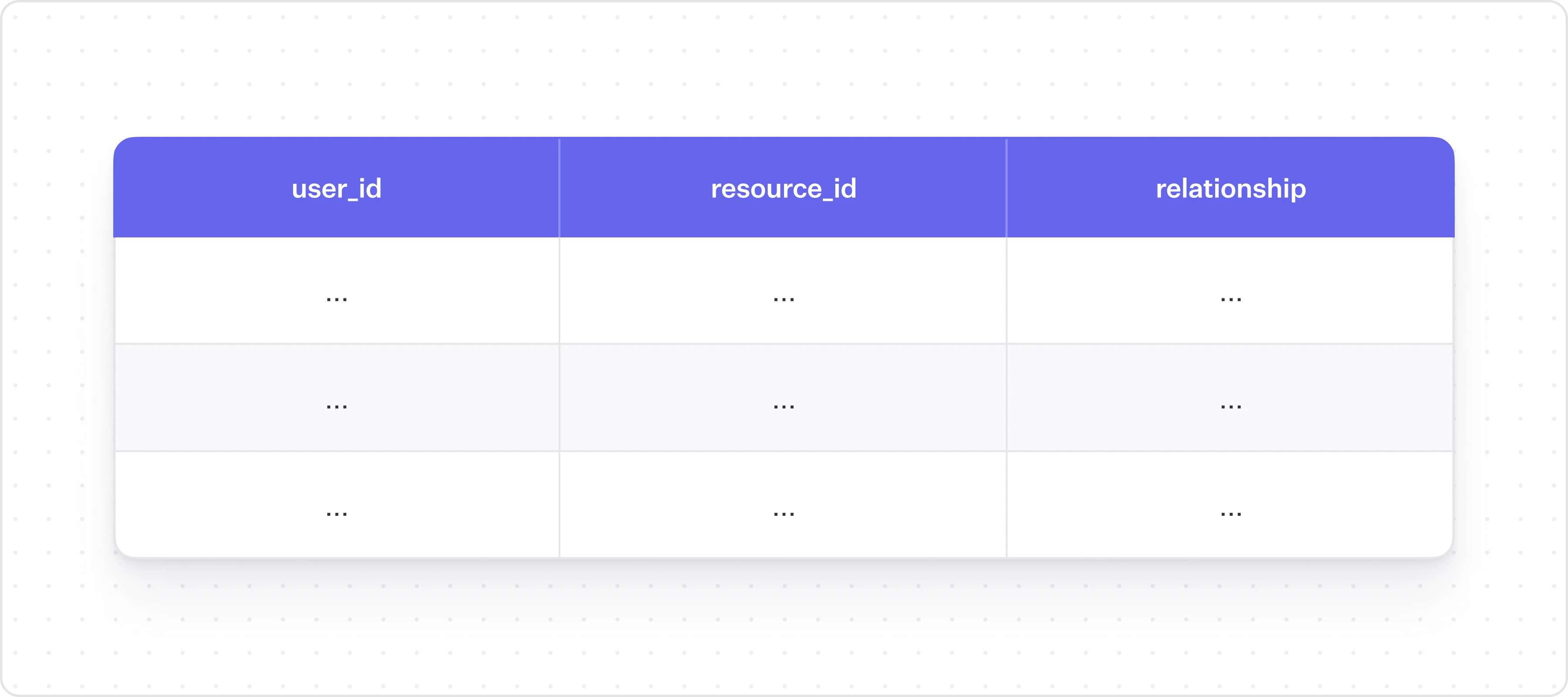
At the core of FGA is the relationship between a user and a resource. A resource is what the canonical object in your application is: a cap table for Carta, a bank account for J.P. Morgan, or a document in Google Drive, or a file in Figma.


The relationship field is highly dependent on your business: it could be as simple as read or write or as complex as edit_maximum_of_5_rows_during_the_day. This type of FGA relationship data is very difficult to represent efficiently in a relational database, and tends to be a much better fit for a graph model.

In practice, you don’t need to enumerate every possible permutation of user and resource in your system. FGA systems will also make use of roles, especially to assume default states. For example, you might have a group called “Airtable Admins” who have default permissions to every single Airtable base in the organization. In essence, people like to define their permissions through groups and roles, but check them at the user level.

Building resolver logic

Where the FGA data model gets complicated is what we call “resolvers” – all of the cases where a relationship isn’t explicitly coded into an authorization check, but is implied by other existing roles or hierarchies. You will need to write custom logic to resolve these yourself. Let’s run through a few examples. 

Consider some basic hierarchy:

  • You are part of the Airtable Admins group
  • The Airtable Admins group is an owner of Top Secret Base
  • Ergo, you are an owner of Top Secret Base

In an RBAC system, you being in the Airtable Admins group would mean that you pass the check to own Top Secret Base. In an FGA world though, it goes a level deeper, almost like a compiler or resolver: because you are in the Airtable Admins group, that means that you are personally an owner of Top Secret Base, and that’s why you pass the check. So this is logic that you need to write.

Another example: imagine a simple Google Docs authorization hierarchy. I set access to my doc such that everyone in my organization has comment access. Even though I haven’t shared the doc individually with my coworker, since she is part of my organization, my system needs to calculate that she, individually, has comment access to the doc. This kind of resolver is simple enough to build.

Next part. A Google Doc has the concept of an owner, an editor, and a viewer. An owner implies that you’re also an editor, which implies that you’re a viewer. This notion of permission inheritance is another “resolver” related thing that you will need to build yourself.

These two ideas – inheritance between roles, and inheritance between permissions – are the two big pieces of building a resolver system. If you can get these implemented, most other cases will fall in line. But you will likely find that edge cases from your customers make these things take much longer than they should, especially at scale.

Centralized vs. decentralized FGA

A central piece of discussion in authorization is building centralized systems vs. decentralized ones – should your authorization system be its own service? There are two pieces to this: the data storage can be centralized or decentralized, and your check system can be too. 

In an RBAC world, most teams don’t need to worry about services for a while. The scale of data is inherently smaller, you can scale to even millions of rows without much of a hiccup, and many developers are just shoving roles and permissions into a JWT anyway. FGA, on the other hand, tends to lend itself more to a centralized architecture (i.e. its own service) for a couple of reasons. 

The first is that if your customers have the kinds of complex requirements that call for building out an FGA system, chances are you’re further along in your company journey and might have already split out your architecture into a service based one. And you certainly don’t want to replicate your check logic for every single service.

The second is that the FGA data model is inherently more inclined towards large data volumes than RBAC, and if you’re building it yourself, at some point you will necessarily need to move it into its own database so it can scale independently. This, plus the fact that these relationships are more naturally represented in a graph database, which in all likelihood is not the kind of database you’re using for production.

In practice, whether teams choose to centralize or decentralize this tends to depend more on their existing architecture. But FGA definitely lends itself more to a centralized implementation.

Outsourcing FGA (open source or otherwise)

Tons of teams will implement RBAC on their own. FGA, given how difficult it is, less common. And until a few years ago, there weren’t a ton of options for outsourcing.

Google Zanzibar is Google’s internal authorization system: it supports millions of authorization requests per second for products like YouTube and Drive. In 2019, they released a paper at USENIX that ran through how it works. To quote Carta’s AuthZ blog post, which has a nice summary:

One of Zanzibar’s core features is a uniform language that is used to define permissions. Zanzibar consumers use the uniform language to build Access Control Lists (ACLs). ACLs are like unix file permissions. They give users access to individual resources in the system. With Zanzibar, services compose abstractions for user permission groups. User permission groups can compose each other. They also grant access to low-level resource ACLs.

So essentially, it’s implemented as a centralized service that handles both the data and the resolvers. Since the 2019 paper, several open and closed source implementations have popped up on the market. You now have a bunch of options for “buying” FGA, like:

  • WorkOS FGA (built on Warrant)
  • SpiceDB (OSS) from Authzed
  • OpenFGA (OSS)

You can pick OSS FGA systems off the shelf, but it only solves a part of the problem, since at scale these things are major operations to run. If you’re at a company like Figma, you’ll still need a 3 person team to manage this for you. You need to provide and manage a database, maintain performance, and keep the high uptime and availability that a centralized system needs.

I would also be remiss if I didn’t mention Open Policy Agent. It’s a framework for writing and evaluating policies for authorization. But OPA doesn’t have any data; it’s just policies. It’s like you’re running a function, but you need to provide the input at runtime. So I wouldn’t consider it a solution (in the traditional sense of the word) for completely building FGA. The Zanzibar model is a more natural fit for these business app type use cases, whereas OPA is really good for infra authorization (e.g. only allow ingress from this IP). 

Frontend / UI considerations

FGA has a few considerations to mention when it comes to building UI for your users to set and adjust these permissions. You’ve probably seen this bad boy before:


In an FGA universe, your users need to be able to share any resource with any individual user or group, plus see (and adjust) which users currently have access. That’s this screen:


On the backend, this expresses itself as two different types of queries. There’s the concept of the check, which deals with whether (in a boolean sense) a user has permission to do a certain thing to a certain resource. But there is also the concept of the list, which deals with the total set of who has what permissions to this resource. The list is the data you want when you’re building UI for users to be creating and updating these permissions in the first place.

In WorkOS we have these two APIs split out. There’s the Check API, which you’d use to do a check on whether a user has access to something, and the Query API, which you’d use to see all of the users that have access to something. 

Bonus: FGA and Identity Providers

If you have customers large and sophisticated enough to be requesting authorization features that have you wondering if you should look at FGA, there’s a 90% chance they will be running their identity and access management through an Identity Provider (IdP) like Okta. These IdPs are the central source of truth for who works at these organizations, how they authenticate, and what they have access to.

RBAC plays nicely with these IdPs; FGA does not. The fundamental concept of resource-based authorization doesn’t really work well with IdP-based authorization at all. FGA is dynamic: I just created a new Figma file, I just built a new Hubspot contact list, and here’s a project ID. There’s no way an IT admin would be able to interpret all of these and apply the appropriate groups and roles. 

We are guessing that things will go towards a hybrid RBAC/FGA direction in the future. If you’re interested in learning more about how these ideas interact with IdPs, check out our Developer’s Guide to RBAC and IdPs. It runs through a few best practices for setting up the FGA/role architecture on your end to work well with Okta and the like (to the extent it’s currently possible).

Eruption Forecasting using Bayesian Networks

Mike's Notes

I don't know enough to describe Pipi technically. I know that I built Fuzzy Logic and Markov into its design. I suspect Bayesian Networks and some kind of Monte Carlo are also involved. But I don't have any formal training in Mathematics apart from High School, to be sure.

Part of the problem is that I accidentally stumbled across an architecture that worked to solve a problem I wanted to solve.

I will ask my friends Alex and Chris ( both retired computer scientists) to help determine what is happening.

I may also find a friendly mathematician lurking around Wolfram.

Here is an article from the GNS publication "Beneath the Waves" that makes me think Bayesian probably is happening because of the first figure. It looks like what I have done anyway.

"Bayesian networks are a type of Probabilistic Graphical Model that can be used to build models from data and/or expert opinion. They can be used for a wide range of tasks including diagnostics, reasoning, causal modeling, decision making under uncertainty, anomaly detection, automated insight and prediction." ... Bayes Server

"A Bayesian network (also known as a Bayes network, Bayes net, belief network, or decision network) is a probabilistic graphical model that represents a set of variables and their conditional dependencies via a directed acyclic graph (DAG).[1] While it is one of several forms of causal notation, causal networks are special cases of Bayesian networks. Bayesian networks are ideal for taking an event that occurred and predicting the likelihood that any one of several possible known causes was the contributing factor. For example, a Bayesian network could represent the probabilistic relationships between diseases and symptoms. Given symptoms, the network can be used to compute the probabilities of the presence of various diseases." ... Wikipedia

Resources

References

  • Reference

Repository

  • Home > Ajabbi Research > Library >
  • Home > Handbook > 

Last Updated

17/05/2025

Eruption Forecasting using Bayesian Networks

GNS Science: 04/12/2024

A novel method of eruption forecasting has been developed using Bayesian Networks. This innovation allows for data-based forecasts of activity without reliance on a single monitoring dataset.

What is a Bayesian Network?

A Bayesian Network is a simple model and statistical tool that can be used to determine the probability of an event happening, based on:

  • a set of variables (nodes) that influence the event occurring,
  • the relationships and dependencies between the variables,
  • prior information about the event, and
  • prior information about the variables.

Bayesian networks can combine different sources of information by defining a system of conditional probabilities between sources. An event is then simply a certain constellation of that system for which the Bayesian Network will give us a probability of occurrence.

A Bayesian network (e.g. see Figure 1) has two main components:

  • the causal relationships between the variables in the system, and
  • the actual probabilities for the variable (node) that are used to make predictions.


Figure 1: A Bayesian Network showing the relationship between nodes for a volcanic eruption and the variables that can be measured (e.g. gas monitoring (CO2, H2S, SO2), volcanic tremors (RSAM)).

A Bayesian network is learned from data and previous patterns. Having knowledge of a previous event can help the model to predict the probability of a future event. Because Bayesian Networks also include prior information, they  are resilient to gaps in information (such as missing sensors).

Eruption Forecasting at Whakaari | White Island

Since the 2019 eruption, destruction of monitoring equipment on island means that Whakaari (White Island) has reduced real-time monitoring data. Yet, eruption forecasting is still possible through the ongoing monitoring of volcanic activity (e.g. remote sensing, monthly gas plume monitoring). Using Bayesian Networks, we have developed and tested a novel method of eruption forecasting that does not solely rely on on-island data streams.

The Bayesian Network was trained on most of the Whakaari monitoring data available since 2009. Figure 2 shows the timing of past eruptions on Whakaari. Group A data (2009-2012) was the initial training set used to model the 2013 eruption, Group A & B were used to predict the 2016 eruption, and so forth. In this manner, the error margins of the network were greatly improved, and the model was found to be effective even when not all data streams are available, such as the current day situation. Results from this network showed increases in eruption likelihood prior to the 2012-2019 sequences, even when using airborne gas measurements only.


Figure 2: Past monitoring data was used to train the Whakaari Bayesian Network.

Once this new method has gone through the scientific peer-review process, it will become an important part in setting life safety parameters around the volcano. Forecasts will be updated automatically as new monitoring data becomes available and provided to geohazard response staff. This information will help GNS Science to perform it’s monitoring and advisory requirements to advise external stakeholders of increases in eruption likelihood.

Forecasts from our BN are easy to understand and interpret by volcanologists, which adds to its usefulness for decision support and expert advice. Expert judgment can also be easily integrated and potentially help to improve forecasts in the absence of data.

Comparison of open-source configuration management software

Mike's Notes

I need to think about how to manage complex cloud deployments, both public and private.

Parts of Pipi will need to be deployed in virtual machines (VM) on GCP, Azure, AWS, IBM, etc.

OpenNebula would be a good start, initially with a free community edition and then a paid subscription as needs develop.

Using text configuration files would enable Pipi to self-manage the process. Ansible Playbooks written in YAML could be a solution.

Resources

References

  • Reference

Repository

  • Home > Ajabbi Research > Library >
  • Home > Handbook > 

Last Updated

17/05/2025

Comparison of open-source configuration management software

Wikipedia:

...

Short descriptions

Not all tools have the same goal and feature set. Here is a short description of each software package to help distinguish between them.

Ansible

Combines multi-node deployment, ad-hoc task execution, and configuration management in one package. Manages nodes over SSH and requires python (2.6+ or 3.5+) to be installed on them.[105] Modules work over JSON and standard output and can be written in any language. Uses YAML to express reusable descriptions of systems.

Bcfg2

Software to manage the configuration of a large number of computers using a central configuration model and the client–server paradigm. The system enables reconciliation between clients' state and the central configuration specification. Detailed reports provide a way to identify unmanaged configuration on hosts. Generators enable code or template-based generation of configuration files from a central data repository.

CFEngine

Lightweight agent system. Manages configuration of a large number of computers using the client–server paradigm or stand-alone. Any client state which is different from the policy description is reverted to the desired state. Configuration state is specified via a declarative language.[106] CFEngine's paradigm is convergent "computer immunology".[107]

cdist

cdist is a zero dependency configuration management system: It requires only ssh on the target host, which is usually enabled on all Unix-like machines. Only the administration host needs to have Python 3.2 installed.

Chef

Chef is a configuration management tool written in Erlang,[108] and uses a pure Ruby DSL for writing configuration "recipes". These recipes contain resources that should be put into the declared state. Chef can be used as a client–server tool, or used in "solo" mode.[109]

Consfigurator

While Debian and derivatives are the best supported distributions, Consfigurator also work on other distributions and various unixes but they have less support for properties for configuring specific aspects of the system. Consfigurator can set properties to be applied in scheme. This requires Consfigurator to be installed on the target computer. A more restricted language is also available which works without needing Consfigurator to be installed on the target. Remote configuration is also supported: the of hosts can be defined with scheme code.

Guix

Guix integrates many things in the same tool (a distribution, package manager, configuration management tool, container environment, etc). To remotely manage systems, it needs the target machines to already run Guix or it can also alternatively deploy configurations inside Digital Ocean Droplet. The machines are configured with Scheme.

ISconf

Tool to execute commands and replicate files on all nodes. The nodes do not need to be up; the commands will be executed when they boot. The system has no central server so commands can be launched from any node and they will replicate to all nodes.

Juju

Juju concentrates on the notion of service, abstracting the notion of machine or server, and defines relations between those services that are automatically updated when two linked services observe a notable modification.

Local Configuration system (LCFG)

LCFG manages the configuration with a central description language in XML, specifying resources, aspects and profiles. Configuration is deployed using the client–server paradigm. Appropriate scripts on clients (called components) transcribe the resources into configuration files and restart services as needed.

Open PC server integration (Opsi)

Opsi is desktop management software for Windows clients based on Linux servers. It provides automatic software deployment (distribution), unattended installation of OS, patch management, hard- and software inventory, license management and software asset management, and administrative tasks for the configuration management.

PIKT

PIKT is foremost a monitoring system that also does configuration management. "PIKT consists of a sophisticated, feature-rich file preprocessor; an innovative scripting language with unique labor-saving features; a flexible, centrally directed process scheduler; a customizing file installer; a collection of powerful command-line extensions; and other useful tools."

Puppet

Puppet consists of a custom declarative language to describe system configuration, distributed using the client–server paradigm (using XML-RPC protocol in older versions, with a recent switch to REST), and a library to realize the configuration. The resource abstraction layer enables administrators to describe the configuration in high-level terms, such as users, services and packages. Puppet will then ensure the server's state matches the description. There was brief support in Puppet for using a pure Ruby DSL as an alternative configuration language starting at version 2.6.0. However this feature was deprecated beginning with version 3.1.[

Quattor

The quattor information model is based on the distinction between the desired state and the actual state. The desired state is registered in a fabric-wide configuration database, using a specially designed configuration language called Pan for expressing and validating configurations, composed out of reusable hierarchical building blocks called templates. Configurations are propagated to and cached on the managed nodes.

Radmind

Radmind manages hosts configuration at the file system level. In a similar way to Tripwire (and other configuration management tools), it can detect external changes to managed configuration, and can optionally reverse the changes. Radmind does not have higher-level configuration element (services, packages) abstraction. A graphical interface is available (only) for OS X.

Rex

Rex is a remote execution system with integrated configuration management and software deployment capabilities. The admin provides configuration instructions via so-called Rexfiles. They are written in a small DSL but can also contain arbitrary Perl. It integrates well with an automated build system used in CI environments.

Salt

Salt started out as a tool for remote server management. As its usage has grown, it has gained a number of extended features, including a more comprehensive mechanism for host configuration. This is a relatively new feature facilitated through the Salt States component. With the traction that Salt has gotten in the last bit, the support for more features and platforms might continue to grow.

SmartFrog

Java-based tool to deploy and configure applications distributed across multiple machines. There is no central server; you can deploy a .SF configuration file to any node and have it distributed to peer nodes according to the distribution information contained inside the deployment descriptor itself.

Spacewalk

Spacewalk is an open source Linux and Solaris systems management solution[buzzword] and is the upstream project for the source of Red Hat Network Satellite. Spacewalk works with RHEL, Fedora, and other RHEL derivative distributions like CentOS, Scientific Linux, etc. There are ongoing efforts on getting it packaged for inclusion in Fedora. Spacewalk provides systems inventory (hardware and software information, installation and updates of software, collection and distribution of custom software packages into manageable groups, provision systems, management and deployment of configuration files, system monitoring, virtual guest provisioning, starting/stopping/configuring virtual guests and delegating all of these actions to local or LDAP users and system entitlements). As of May 2020, Spacewalk is now EOL with users having moved to either Uyuni or Foreman/Katello.

STAF

The Software Testing Automation Framework (STAF) enables users to create cross-platform, distributed software test environments. STAF removes the tedium of building an automation infrastructure, thus enabling users to focus on building their automation solution.[buzzword] The STAF framework provides the foundation upon which to build higher-level solutions[buzzword], and provides a pluggable approach supported across a large variety of platforms and languages.

Synctool

Synctool aims to be easy to understand, learn and use. It is written in Python and makes use of SSH (passwordless, with host-based or key-based authentication) and rsync. No specific language is needed to configure Synctool. Synctool has dry run capabilities that enable surgical precision. Synctool depends on Python2 which is now EOL and there are no current plans to migrate it to Python3.

OpenNebula Conference

Mike's Notes

This might be very useful later for Pipi to deploy onto server farms. OpenNebula is an excellent alternative to VMware.

There is a free community edition and paid subscriptions. An enterprise subscription looks promising. Managed services are also available.

Playbooks

It uses playbooks which can drive Ansible when deploying. 

"Playbooks are YAML files that store lists of tasks for repeated executions on managed nodes. Each Playbook maps (associates) a group of hosts to a set of roles. Each role is represented by calls to Ansible tasks." - Wikipedia

Example of a playbook code at the bottom

Options

It can do "heterogeneous data centre, public cloud and edge computing infrastructure resources".

Conferences

"Born back in 2013, OpenNebula Conferences are educational events that serve as a meeting point of cloud users, developers, administrators, integrators and researchers, featuring talks with experiences and use cases. They also include Hands-on tutorials, workshops, and hacking sessions that provide an opportunity to discuss burning ideas, and meet face to face to discuss development. Previous speakers include Telefonica, Booking.com, Innologica, King, Nordeus, StorPool, Santander Bank, CentOS, European Space Agency, FermiLab, Puppet, Red Hat, BlackBerry, Akamai, Runtastic, Citrix, Trivago… and many more." ... OpenNebula

Resources

References

  • Reference

Repository

  • Home > Ajabbi Research > Library >
  • Home > Handbook > 

Last Updated

17/05/2025

OpenNebula

Wikipedia:

OpenNebula is an open source cloud computing platform for managing heterogeneous data center, public cloud and edge computing infrastructure resources. OpenNebula manages on-premises and remote virtual infrastructure to build private, public, or hybrid implementations of infrastructure as a service (IaaS) and multi-tenant Kubernetes deployments. The two primary uses of the OpenNebula platform are data center virtualization and cloud deployments based on the KVM hypervisor, LXD/LXC system containers, and AWS Firecracker microVMs. The platform is also capable of offering the cloud infrastructure necessary to operate a cloud on top of existing VMware infrastructure. In early June 2020, OpenNebula announced the release of a new Enterprise Edition for corporate users, along with a Community Edition. OpenNebula CE is free and open-source software, released under the Apache License version 2. OpenNebula CE comes with free access to patch releases containing critical bug fixes but with no access to the regular EE maintenance releases. Upgrades to the latest minor/major version is only available for CE users with non-commercial deployments or with significant open source contributions to the OpenNebula Community. OpenNebula EE is distributed under a closed-source license and requires a commercial Subscription.

...

OpenNebula orchestrates storage, network, virtualization, monitoring, and security technologies to deploy multi-tier services (e.g. compute clusters) as virtual machines on distributed infrastructures, combining both data center resources and remote cloud resources, according to allocation policies. According to the European Commission's 2010 report "... only few cloud dedicated research projects in the widest sense have been initiated – most prominent amongst them probably OpenNebula ...".

The toolkit includes features for integration, management, scalability, security and accounting. It also claims standardization, interoperability and portability, providing cloud users and administrators with a choice of several cloud interfaces (Amazon EC2 Query, OGF Open Cloud Computing Interface and vCloud) and hypervisors (VMware vCenter, KVM, LXD/LXC and AWS Firecracker), and can accommodate multiple hardware and software combinations in a data center.

OpenNebula is sponsored by OpenNebula Systems (formerly C12G).

OpenNebula is widely used by a variety of industries, including cloud providers, telecommunication, information technology services, government, banking, gaming, media, hosting, supercomputing, research laboratories, and international research projects[citation needed].

...

Internal architecture

Basic components

OpenNebula Internal Architecture

  • Host: Physical machine running a supported hypervisor.
  • Cluster: Pool of hosts that share datastores and virtual networks.
  • Template: Virtual Machine definition.
  • Image: Virtual Machine disk image.
  • Virtual Machine: Instantiated Template. A Virtual Machine represents one life-cycle, and several Virtual Machines can be created from a single Template.
  • Virtual Network: A group of IP leases that VMs can use to automatically obtain IP addresses. It allows the creation of Virtual Networks by mapping over the physical ones. They will be available to the VMs through the corresponding bridges on hosts. Virtual network can be defined in three different parts:
    1. Underlying of physical network infrastructure.
    2. The logical address space available (IPv4, IPv6, dual stack).
    3. Context attributes (e.g. net mask, DNS, gateway). OpenNebula also comes with a Virtual Router appliance to provide networking services like DHCP, DNS etc.

Playbook example (YAML)

(one-deploy-py3.12) front-end:~/my-one$ ansible-playbook -v opennebula.deploy.main

Using /home/basedeployer/my-one/ansible.cfg as config file

running playbook inside collection opennebula.deploy

[WARNING]: Could not match supplied host pattern, ignoring: bastion


PLAY [bastion] *******************************************************************************************

skipping: no hosts matched

[WARNING]: Could not match supplied host pattern, ignoring: grafana

[WARNING]: Could not match supplied host pattern, ignoring: mons

[WARNING]: Could not match supplied host pattern, ignoring: mgrs

[WARNING]: Could not match supplied host pattern, ignoring: osds


PLAY [frontend,node,grafana,mons,mgrs,osds] **************************************************************


TASK [opennebula.deploy.helper/python3 : Bootstrap python3 intepreter] ***********************************

skipping: [f1] => changed=false

  attempts: 1

  msg: /usr/bin/python3 exists, matching creates option

skipping: [n2] => changed=false

  attempts: 1

  msg: /usr/bin/python3 exists, matching creates option

skipping: [n1] => changed=false

  attempts: 1

  msg: /usr/bin/python3 exists, matching creates option


...


TASK [opennebula.deploy.prometheus/server : Enable / Start / Restart Alertmanager service (NOW)] *********

skipping: [f1] => changed=false

  false_condition: features.prometheus | bool is true

  skip_reason: Conditional result was False


PLAY [grafana] *******************************************************************************************

skipping: no hosts matched


PLAY RECAP ***********************************************************************************************

f1                         : ok=84   changed=33   unreachable=0    failed=0    skipped=75   rescued=0    ignored=0

n1                         : ok=37   changed=12   unreachable=0    failed=0    skipped=57   rescued=0    ignored=0

n2                         : ok=37   changed=12   unreachable=0    failed=0    skipped=48   rescued=0    ignored=0