Research Repositories 101

Mike's Notes

NN Group has a series of articles on Research Repositories. 

Below are notes from an article by Maria Rosila.

Resources

References

  • Reference

Repository

  • Home > Ajabbi Research > Library >
  • Home > Handbook > 

Last Updated

18/04/2025

Research Repositories 101

By: Maria Rosila
NNGroup: 05/07/2024

Components

"Research repositories often house (or link out to) the following items:
  • Research reports capture what happened and what was learned in the research study. A research report usually includes overarching themes, detailed findings, and sometimes recommendations.
  • Research insights are the detailed findings acquired from each research study. While insights also appear in reports, saving them as their own entities makes them easier to see and address.
  • Study materials, such as research plans and screeners, allow team members to learn how research insights were gathered and easily replicate a study method.
  • Recordings, clips, and transcriptions make user data easily accessible. Summarizing and transcribing each video allows teams to search for keywords or specific information.
  • Raw notes and artifacts from research sessions might be useful for future analysis and can sometimes be easier to read or process than a full transcript or video recording. " - NNGroup
"Research repositories organize user research in a central place, making research-related documentation easy to access and consume.

As a research function scales, managing the growing research-related body of knowledge becomes a challenge. It’s common for research insights to get lost in hard-to-find reports. When this happens, research efforts are sometimes duplicated. Enter research repositories: an antidote to some of these common growing pains. ..." - NNGroup

How can on-site servers enable richer retail experiences?

Mike's Notes

This is republished from the ThoughtWorks Insights Blog.

Resources

References

  • Reference

Repository

  • Home > Ajabbi Research > Library >
  • Home > Handbook > 

Last Updated

18/05/2025

How can on-site servers enable richer retail experiences?

By: Chris Ford
ThoughtWorks Insights: 21/05/2023

Running servers in a retail store: sounds a little strange, right? However, there are multiple reasons you might want to do it. In this discussion, Thoughtworkers Chris Ford and Alessandro Salomone explore why you might want to run in-store servers — and how it can be done.

Part one: Business motivation

When people think about omnichannel retail experiences, they often start by considering in-store and digital as two distinct elements. But for a modern retailer, in-store is just another kind of digital, sometimes referred to as “phygital”.

It’s now a given that customers expect the store experience to be well-integrated into the retailer’s online presence and that they have little tolerance for services or data that are available in one touchpoint but absent in another.

Progressive retailers go further and take advantage of physical presence to address a customers’ needs contextually – someone browsing in a store requires different inspiration than the same person ordering from their couch at home.

As the relationships between different digital touchpoints become more complex, we need to develop new architectures that are resilient enough to keep stores running, powerful enough to support rich digital experiences and responsive enough to change that we can evolve them alongside the business.

Above all, we must not let the increasing digitalization of retail cause business fragility. Recent high profile cases have shown that when digital service is interrupted, it can cause massive business disruption.

My colleague Alessandro mentioned to me a system he was working on that deploys Docker containers to servers running in the stores of a large food retailer. They power point-of-sale systems that serve customer experience as well as store back office systems for processing payments and orders.

When I first heard this, it sounded like an odd mixture of technologies, as I had previously only encountered containers used in data centers or for local development environments. But when he explained the goals and trade-offs of the system architecture, I understood containerised on-site servers as a pattern that is likely to become more important as businesses bring the physical and the digital ever closer.

Digitally-powered stores

Chris Ford: Why does a store need to be integrated into a wider digital architecture in the first place?

Alessandro Salomone: Retailers have recognized the benefits of digitally-enabled stores for a long time now. One key motivator of a digital architecture is the ability to get to know your customers and to offer them targeted promotions based on their needs and tastes. This is especially true in food retailing, my client’s sector. Customers may consume products in more than one of your shops, so having a system that aggregates customer information will ensure a consistent and personalized experience wherever they shop from. 

And of course, you want your infrastructure to bridge the online and in-store shopping experiences, with the opportunity for the user to browse products, electronic receipts and benefit from personalized vouchers for the products that they are likely to love and buy.

In a post-Covid environment, retailers are actively looking to experiment and cultivate customer engagement and are particularly focused on attracting customers back to stores. Point-of-sale systems and in-store digital experiences are important investment areas to achieve this.

And on a practical level, as your business model gets more complex, you want to make sure that business processes in all your stores are supported by an infrastructure that ensures a consistent experience and implementation of such processes.

Lastly, collecting data from your stores can help you gather insights on your business in terms of fine-grained financial projections. You will have data coming from all your stores to discover the seasonality of your offering as well as to gather visibility on product waste, and appeal of your product to regional markets, just to mention a few. All this can lead to better targeted marketing and promotion design, that can help you strengthen the foundation of your business and let it grow and adapt to the ever changing landscape of the market.

Running servers in stores

CF: What reason do retailers have for installing local servers in their stores? Wouldn’t it be simpler to just talk directly to a central server running in a data center?

AS: Talking to a central server would be indeed simpler. And that's how you want everything to appear to your customers and attendants when they are shopping or operating the store — everything is connected and it all just works. You want to launch new products and promotions from a single, central point, and ensure all stores receive the same information at the right time and, as we mentioned earlier, you want to be able to identify your customers and offer them tailored services and products.

In practice, there are a few technical constraints to consider. Running a business in a store means having several classes of in-store devices that operate together to provide a seamless experience to the customer and the store personnel: security cameras, handheld devices for inventory and price labeling, scales, payment checkout tills, not to mention back office applications for stock management and solutions for walk-out checkout customer experience. 

The overriding business consideration is to ensure availability of critical services that support an uninterrupted shopping experience. The most likely disruptive event is the loss of network connectivity from the store to the central services. Crucial customer flows, like checkout and payment, must be guaranteed in this scenario. The benefits of digitization count for nothing if our technology introduces fragility that threatens business continuity.

Beyond plain checkout, how can you guarantee that the customer who just grabbed a three for two deal on roasted coffee beans can enjoy their anticipated discounts even when the internet connection goes down as the cashier is scanning them at the till? All product, price and promotion information should be readily available. Perhaps a network interruption means you can’t access promotions based on the shopper’s personal history, so how do you gracefully degrade service and still provide product level discounts? 

What if your customer is entering your walk-out store by tapping their loyalty card at the gates and there’s no, or slow, internet connection? You don’t want to make them wait: they should be swiftly welcomed by an opening gate, while the system will figure out how to identify them and eventually charge their preferred payment method as they walk out.

A store server that caches the critical business information and is able to autonomously implement business flows acts as a buffer between the store and the central services, ensuring that local store operations can go on undisturbed, and that any changes will be synchronized as soon as the connection is restored.

Another motivation for having a local server is the local management of store-specific data. The device that prints the tags to be placed on the shelves shall show the same prices and promotions that will be printed on the customer’s bill. It’s standard for retailers to vary pricing based on store considerations like location and nearby competition. But what about dynamic factors, for example whether a store has excess stock of a specific good that should be effectively depleted?

Be it a consumer electronic product imminently obsoleted by an upcoming new model, or a bottle of milk soon reaching its expiry date, the store could apply a dedicated promotion campaign targeted at reducing stock, that is going to potentially cause waste, while making customers happy. This requires the in-store personnel to be able to set up a campaign for their store from the back office application, overriding set prices and promotions, while ensuring that all the devices in store are ready to show the same information.

CF: Doesn’t this contradict the prevailing wisdom that businesses should migrate to the cloud?

AS: This architecture is not about going back to on-premise data centers. In the terminology of cloud computing, this is more like an edge computing architecture – augmenting cloud capabilities with compute situated closer to the customer. Edge computing isn’t in competition with the cloud, but a complement to it. Your favorite cloud provider almost certainly has a story around edge computing, because the advantages around resilience and latency are compelling for some use cases.

That being said, having to manage and deploy to on-premise machines and devices is more complicated than operating in a purely virtual environment. Perhaps we can talk later on about the engineering needed to pull it off.

CF: Could I think of running retail software on-site servers like installing apps on my mobile phone? A lot of the time, I happily rely on websites that are hosted in remote data centers, but for some things it’s better if the program is installed on the device in my hand.

AS: Correct, websites are fine if you don’t mind being interrupted if you lose mobile phone signal. But when you run an app locally, you get better performance and integration with the rest of your mobile experience. With an app, depending on what operations you want to do, some of them can still be performed even when you have an intermittent internet connection.

An example you may be familiar with is Google Docs. If you install the app on your mobile it lets you continue to work even when you are offline, and transparently syncs with the server when you have connectivity again.

In the same way, having servers in the store means having your business data and logic here, next to where you need them, without being dependent on something external to operate. Having smart devices communicate with a local server that orchestrates your business processes allows your stores to operate independently, while remaining aligned with the overall business implementation and its evolution dictated by the central services.

CF: Can you give me an idea of the scale of the architectures you’ve worked on? How many stores, how many services etc?

AS: In one of our projects we worked with a client supporting 40,000 devices in more than 2000 stores. Each device would be configured to receive daily business data updates and to send near real-time telemetry and analytical data to the central servers. At this scale, device failures and network interruptions happen all the time, so your system better be prepared to deal with them.

Related use cases from other industries

CF: Do you see on-site servers being used in other industries or contexts?

AS: On-site servers are a concept applicable in several other industries. This architecture brings advantages wherever there is the need for data and operations being available for highly-critical business processes or in businesses where good network connectivity is an inherent issue or cost.

One example that we have discussed with clients is hospitals. A modern medical center is a sophisticated information technology hub. It runs various software that manage sensitive clinical as well as operational data. Applications running on local servers offer a way to support these applications and also to gracefully upgrade them. Tolerance of network failure is essential as the hospital cannot stop treating patients in the case of an outage.

Another is cruise ships. The digital expectations of passengers are rising. Entertainment, schedules, menus, communications and even digital room keys are becoming an essential part of a luxury experience. On-board servers give a way to support these experiences without relying on connectivity that is often unavailable at sea.

Thank you Alessandro for relating your first-hand experience developing software for in-store servers and explaining why retail businesses are motivated to adopt this architecture.

In the next part of this series, I talk with Alessandro about the engineering challenges that come with developing such a system. Deployment, testing and observability require some different approaches relative to systems hosted in data centers.

By Chris Ford

Published: May 21, 2024 

Part two: Engineering

In the first part of this series, Alessandro Salomone described why retailers turn to running servers in their stores. Local servers provide a platform for richer digital experiences for customers, more sophisticated back office processes around data pricing and payment and above all enable resiliency in the case of network failure.

In this follow-up piece, we dive into the engineering you need to do it well. For example, we discuss challenges like testing and deployment and find out why containerization makes this all easier and more robust.

Data synchronization

Chris Ford: Doesn’t a local server introduce problems of data synchronization with the central server? How do you handle that?

Alessandro Salomone: Yes, and no. A setup in which a local server is present helps reduce the volume of data exchanged with the central servers, avoiding each and every device communicating with the servers. It also makes operations faster and more reliable, because the devices benefit from data cached in the local server, on a local network that is more stable and faster than the internet. 

The presence of a local server increases the complexity of the architecture, which has to be designed to ensure eventual synchronization of the information in store and on the central server. Temporary central server unavailability or unreachability, due to heavy loads or connection issues, can cause temporary desynchronization between the two servers.

For this, we designed the servers to communicate using event queues in both directions, allowing the local server to pull events from the central server and vice versa. Events can be anything from the broadcasting of a product update, the availability of a new promotion campaign, a device reporting a failure or a client checking out. Queues allow the servers to catch up on missed updates caused by a temporary disconnection by replaying all the missed events.

Another challenge worth mentioning is sizing on-premise infrastructure. Load is highly unpredictable in stores. The amount of footfall and therefore digital traffic varies a lot between stores and changes at different times of the year. It’s a good idea to make in-store infrastructure as horizontally scalable as possible so that you can add more capacity where you need it. You don’t want to rely on single large machines that will take the whole store down if they are overloaded, while servers in other stores are underutilized.

Testing and deployment

CF: How do you deploy updates to these local servers?

AS: Local servers were running their logic in containerized microservices. This would allow the development teams to publish new versions of the microservices to a central container registry and wait for the local servers to discover and pull the new container images.

The local servers would have their container orchestrator to check for images on a frequent schedule, to ensure new features and bug fixes could be rapidly deployed to all stores.

When you design your container orchestration, be sure to consider the resource constraints of your in-store hardware. Kubernetes and its ecosystem of tools like Argo CD are powerful and might do what you need, but they are also primarily designed for data centers. You have to find a balance between achieving a lightweight solution and avoiding the temptation to roll your own infrastructure orchestration.

CF: How would you test such a setup?

AS: The containerisation makes testing this setup a lot easier than if we were installing applications directly onto local devices. Testing can be done by replicating the containers and their connectivity on a virtual machine and running manual or automated tests, for example using a continuous integration pipeline. In our case we needed an extra step, which was to virtualise the in-store devices that the microservices solution talks to. 

We decided to design the microservices architecture to ensure that every in-store device would have a corresponding containerised microservice that would abstract the device’s data and control interfaces. With a test double for each device microservice, it is possible to replace the original microservice in a test setup. The test containers virtualizing the devices would feature a control port to ensure device data and behavior could be simulated, so as to implement all the required test scenarios, and in fact drive the development.

CF: When deploying to a cluster of servers in a data center, you might test the release with a small group of servers. Is there an equivalent for store servers?

AS: Definitely — in our experience, we built a thin layer on top of our container orchestrator in order to implement a pilot and canary release management. A specific store, or a selected set of stores could be identified as a deployment group for “beta” releases of new software. This would happen regularly and automatically so that all the new features introduced by the new software version would be tested in a controlled environment, and end-to-end customer or store attendant feedback would be collected before releasing the version globally. 

Unpredictable environments

CF: A data center is a very controlled environment. A store is less so. What does support look like when you have servers running out there in the world?

AS: To start with, a VPN LAN is a must for security. Incoming connections should be blocked and outgoing connections should be allowed based on an allow-list. This helps to protect your in-store systems from external threats.

Proper, dedicated support channels should be available to store attendants and managers to quickly communicate issues and get them solved. For this reason a first-level line of support would be available to ensure that any store issue would promptly be recorded and redirected to the correct department and, eventually, development team. This requires the development teams to build support guides that help the first-level support line to address the most easy-to-solve issues, or, in case of more complex or unknown issues, to know what information on the user’s experience and actions to collect and pass to the team, that would speed up its investigation and fix.

A ticketing system would be used to record the user’s issue and automatically reach the development team most likely able to contribute to the solution, by ringing the phone and sending an email to the team member on the roster: just a few minutes and the developer would be in conditions to get in contact with the store personnel.

This is where observability becomes essential: support is part of the product development process, and it has to be thought through from the very beginning. Building and running a system that can collect health metrics on the microservices running on the local server, and possibly from the connected devices, is an effective way to be able to observe what is happening in store and quickly spot issues. Also business metrics on the user flows are essential to understand where users (be it customers or attendants) are getting stuck or are experiencing problems.

With appropriate observability tools, like logs, audits and dashboards, the development team can relate the actions of the people in store with the timestamped information coming from the in-store telemetry, thus gaining that visibility that would allow them to spot the lamented issue. Here it is important to ensure the data is collected and presented in a way that can easily tell the story of what has happened.

In urgent or complex cases, it would become more practical for the development team to directly call back the store and ask them to re-enact the situation, in order to reproduce the error. Thanks to near-real-time telemetry, the developers would be able to see what was happening in store and in the software running there on the local server, and promptly release an emergency fix that would be distributed to all the stores within the hour.

High-traffic periods

CF: I recently spoke to our colleague Glauco about building retail systems to survive Black Friday and Cyber Week. How does this architecture stand up to demand in those busy periods?

AS: A nice thing about this architecture is that store systems are designed to run independently, so Cyber Week and load from elsewhere isn’t really a problem. It’s still very important that everything stays up though!

It is in these periods of the year when the advantages of this distributed architecture are especially visible. One of our customers stated that more than 50% of their yearly revenue would come from Christmas shopping: a period in which the stores need to be fully operational at their maximum capacity, without disruptions.

And of course, information like price changes and promotion campaigns for these weeks need to be readily available before the customers flood in the stores. That’s where the idea came to ensure such data to be delivered in the stores even a week before the new schemes would be effective. All information, accompanied by a proper start and end date, would be readily available and usable by the store server and all the other in-store devices, and active only in the expected time period, even if connection to the central service was a bottleneck.

At the end, the central server acts as a business orchestrator, distributing information and stating the expected behavior, as well as a collector for the observability of the business for support purposes and business intelligence insights. All this while the heavy load is handled seamlessly at the local level.

Thank you Alessandro for your insights running business-critical services via in-store deployments.

These kinds of architectures support next generation in-store experiences, but they also give rise to distributed systems challenges not found in traditional data center based systems.

At Thoughtworks we’ve observed local deployments supporting rich in-store digital functionality as part of a movement back to on-premise, not as an alternative to cloud computing, but as a complement to it. We predict that as in-person and online digital experiences become ever more closely integrated, this trend will continue.

Disclaimer: The statements and opinions expressed in this article are those of the author(s) and do not necessarily reflect the positions of Thoughtworks.

eRwin Data Modeller

Mike's Notes

In the early 2000s, I used Erwin Data Modeller, E/R Studio, and Case Studio 2 to create large data models for Pipi with hundreds of tables or entities.

Resources

References

  • Reference

Repository

  • Home > Ajabbi Research > Library >
  • Home > Handbook > 

Last Updated

18/05/2025

eRwin Data Modeller

By: 
Wikipedia: 08/08/2024

Mike is the inventor and architect of Pipi and the founder of Ajabbi.

Wikipedia

"At its core, erwin has a computer-aided software engineering tool (or CASE tool). Users can utilize erwin Data Modeler as a way to take conceptual data model and create a logical data model that is not dependent on a specific database technology. This schematic model can be used to create the physical data model. Users can then forward engineer the data definition language required to instantiate the schema for a range of database-management systems.The software includes features to graphically modify the model, including dialog boxes for specifying the number of entity–relationships, database constraints, indexes, and data uniqueness. erwin supports three data modeling languages: IDEF1X,] a variant of information technology engineering developed by James Martin, and a form of dimensional modeling notation.
The software also allows users to generate data models by reverse-engineering pre-existing databases that are based on several different formats. Another included feature is erwin’s ability to create reusable design standards: “including naming standards, data type standards, model templates and more.” The software includes several features for modifying how the data model is displayed, including options for several colors, fonts, diagrams, subject areas and layouts.
erwin’s Complete Compare feature allows the user to compare two versions of a model, displays differences, and allows for merging and updates in either direction.As of March 2016, the software bundle also includes its own Report Designer. The erwin DM 2018 update included Netezza, MySQL 8.x, PostgreSQL 10.4, and Hive; model counts reports; and PII support. The 2019 update included DB2 z/OS v12, SQL Server 2017, Teradata v16.20, and PostgreSQL 11.2, in addition to reporting enhancements like user-defined properties and filters." - Wikipedia

Designing Accessible Drag-and-Drop UX

Mike's Notes

Here is an article mentioned on LinkedIn by Vitaly Friedman, Editor of Smashing Magazine. And then more from Atlassian.

Resources

  • Resource

References

  • Reference

Repository

  • Home > Ajabbi Research > Library >
  • Home > Handbook > 

Last Updated

18/05/2025

Designing Accessible Drag-and-Drop UX

By: Vitalay Friedman
LinkedIn: 07/08/2024

Vitaly Friedman is the Editor of Smashing Magazine.

In light of European Accessibility Act and WCAG 2.2 AA it implies, many companies struggle to implement accessible drag-n-drop in their products. In fact, most solutions out there rely on mouse interactions alone — without keyboard support, and hence aren’t accessible.

Once we have reshuffling columns in a data grid, resizing, map interactions or moving cards on a board, we need to design handles and UI controls that support navigation with arrow keys, Esc, Enter, Space. Atlassian’s open-source library is a good option to start with, but intricate drag-n-drop interactions will require a bit more work.

Useful resources:

Atlassian Design System (Figma kit)

Atlassian Core Components + Sticker Sheets (Figma kit)

Drag and Drop UX for Design Systems, by Grace N.

Drag and Drop UX Best Practices, by Ceara Crawshaw

Accessible Drag-n-Drop, by Jesse Hausler

Goldman Sachs Drag-n-Drop

Practical Guide To Drag-n-Drop UX, by yours truly

Atlassian Resources

Designed for delight, built for performance.

By Alex Reardon

Published in Designing Atlassian Jun 18, 2024

The journey of Pragmatic drag and drop

A fundamental way of interacting with lists, columns, cards and pages is through drag and drop interactions. It aids our customer’s abilities to quickly organise and structure info their way, to action work and to collaborate more meaningfully.

We have leveraged a increasing amount of drag and drop solutions in our products over time to solve different pieces of the large and complex drag and drop problem space. However, having multiple drag and drop solutions was slowing our applications down (due to shipping lots of code) and also led to visual and assistive technology inconsistencies.

To address that, we’ve successfully conducted a cross functional effort over the last few years to create and adopt a single drag and drop solution to address our challenges of scale.

Introducing: Pragmatic drag and drop


Some examples of experiences built with Pragmatic drag and drop

Performance

Shipping the code for multiple drag and drop solutions slowed down the startup speed of our applications. Our thinking was to lower the amount of code we were shipping to our users by consolidating on a single solution that was flexible enough to power any drag and drop experience. We had to be careful though, as a flexible solution can quickly become a large solution, which would undermine our goal of improving performance by reducing the amount of code we are sending to users.

In order to obtain flexibility, while also allowing the minimum about of code to be shipped for an experience, we designed Pragmatic drag and drop to be a small core, with a huge amount of optional pieces. This modular approach allows for an experience to only include the code for the features it needs, and nothing more.

By creating a solution with many optional pieces, we unlocked extreme flexibility, while ensuring fantastic performance

Leveraging an optional pieces model also allows more experiences to leverage a shared solution. If one piece of Pragmatic drag and drop doesn’t work for a specific, bespoke experience, we can build just the unique pieces we do need instead, and implement it alongside other shared parts — rather than needing to include a whole seperate drag and drop solution.

Pragmatic drag and drop takes advantage of low level drag and drop primitives that already exist in desktop and mobile browsers in order to ship less code to users. Unfortunately, these primitives have a lot of friction, inconsistencies and bugs which is why a lot of people stay away from using them. Our engineers invested a huge amount of time and tears in creating workarounds and abstractions to enable consistent, safe and ergonomic use of the web platform drag and drop primitives.

For a further technical deep dive into how we optimized for performance in Pragmatic drag and drop, see this talk by Alex Reardon:


Visual consistency

Pragmatic drag and drop offers fantastic low-level building blocks for crafting any drag and drop experience you would like. However, we wanted to make sure that our users had a consistent experience across pages and products. This is a tricky balance to get right.

Through tight collaboration between engineering, design, accessibility and product, we created a design framework for how we think drag and drop should look and feel in our products. Our design framework is framed around principles (“Make it clear what is draggable”) and then implementations of those principles (“Add a visible drag handle icon to draggable entities”). We have intentionally kept this separation as the specific implementation of our principles might look different for some experiences due to constraints or the bespoke nature of the experience.

What tight collaboration looked like for us:

  • Lots of async explorations with screen sharing using loom
  • Playing with experiences together on zoom
  • All crafts had an understanding of technical restraints and usability/accessibility best practices
  • Forming short lived multi discipline teams that worked closely together for large product adoptions
  • Creating rich working prototypes which allows us to appreciate how end to end experiences felt — static designs can only take you so far with multi part interactions
  • Lots of iteration Figma. Having detailed product mock ups also helped explore new ideas quickly

Our design decisions have continued to evolve as we iterate based on how things feel in products, user feedback, as well as the creation of novel experiences. With Pragmatic drag and drop we have intentionally decoupled design outputs from behaviour outputs to give us the room to iterate and experiment on our design without needing to impact the underlying behaviour. This decoupling also allows us to create seperate design outputs for unique experiences.

In order to help promote consistency in what we design and what we ship to our users, we created Pragmatic drag and drop tooling for Figma. Having Figma tooling enables our designers and engineers work with the same visual design language. The modular nature of Pragmatic drag and drop posed a challenge for our Figma outputs, so we focused on simplicity over fidelity. We knew it would be challenging to create a rich drag and drop prototype in Figma that would just ‘work’ — instead, we broke the components down into each part and state of the drag process. We also recorded Looms to provide guidance on how to show the different stages of a drag experience.


A section of the Figma tooling we have created for Pragmatic drag and drop

By working closely together, we were able to ensure that the implementation decisions designers and engineers would come to make would look and feel great for our users, while providing valid alternatives and escape hatches to account for any scenario.

Designing within constraints

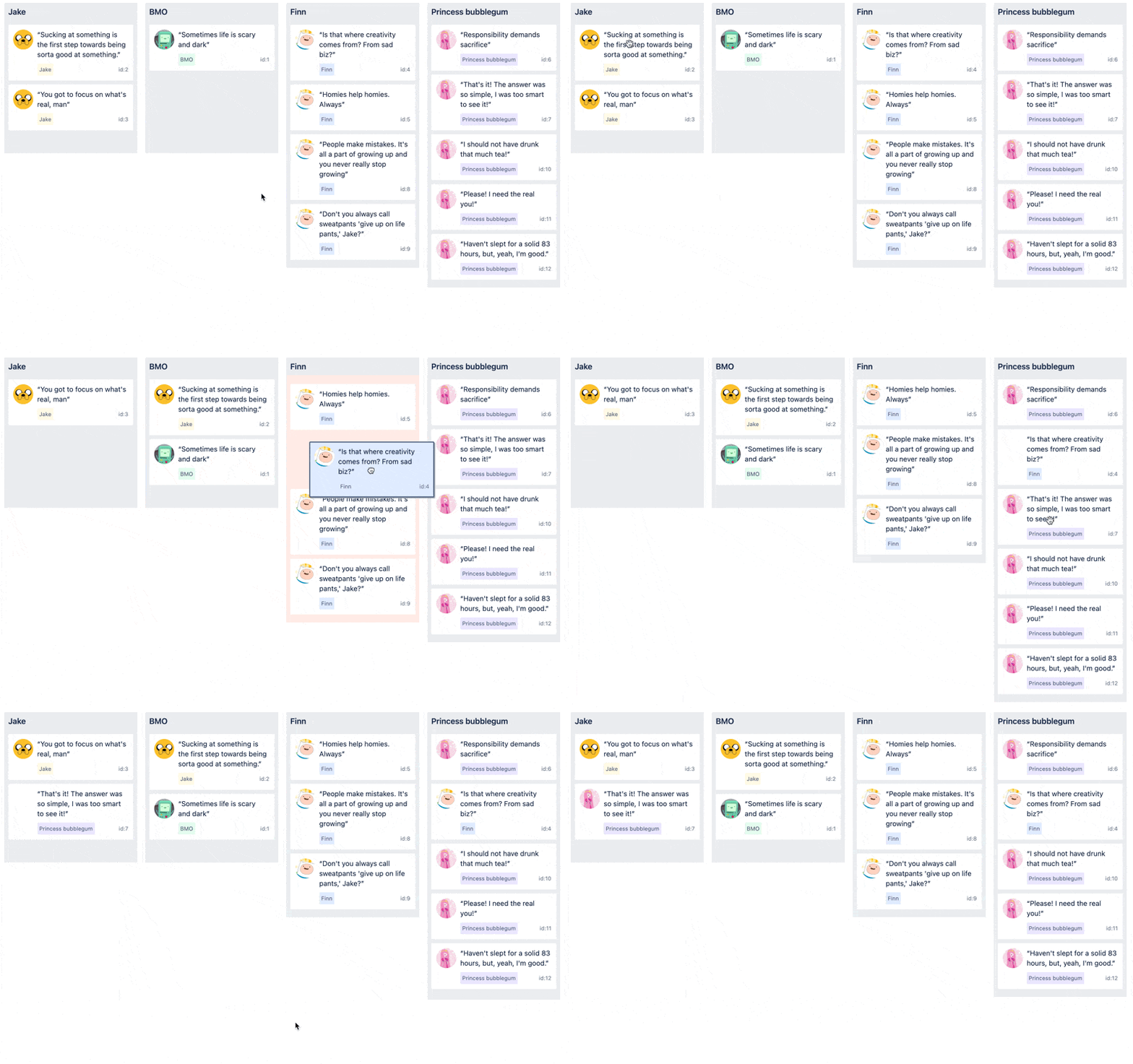
Leveraging the browser’s built-in drag and drop primitives comes with a lot of performance benefits, but it also comes with some fairly painful design constraints. For example, you cannot control the opacity or box shadow on the drag preview (the picture that the user moves around during a drag).

The native drag preview has a built in opacity of about 0.95 and a box shadow that cannot be disabled

Knowing that we were unlocking huge performance benefits when leveraging the web platform, we decided we would design affordances that would play well within the constraints.

One way we leaned into the constraints was by deciding to simplify drag previews, so they only contained crucial information. This constraint actually resulted in a better outcome that was more usable and accessible, since we reduced the amount of information that was being dragged by columns or rows.

The goals of Pragmatic drag and drop helped to guide our visual outputs. Wanting to make a solution that was fast encouraged us to create visual affordances that require a small amount of code and are easy for the browser to render. Our desire for flexibility pushed us towards adopting simple patterns that work well for a large amount of use cases.

react-beautiful-dnd is an older solution of ours for drag and drop that demonstrates a more complex approach:


A board interface powered by react-beautiful-dnd

  • Relies on movement to communicate placement
  • Relying on movement works well for lists and lists of lists, but the pattern does not work well for other types of interfaces.
  • This type of pattern can also feel slow at times as you have to wait for animations to finish before parsing the interface and continuing.

[IMG]

Using movement to communicate placement in a tree experience

We can start to feel the limitations of this pattern with structures that are not flat lists. It can be hard to know what a drag operations will do ahead of time in a tree when whitespace is the only indication of change.

Let’s now look at the design language we have gone for with Pragmatic drag and drop:


  • Leverages lines, borders and background color changes to communicate placement.
  • A lack of animations helps makes the interface feel snappy.
  • Works well for almost experience.
  • If a particular experience doesn’t work well with these affordances, then we can create alternatives — with every experience only including that code it needs for that experience.


Using borders, background colors and lines to communicate placement in a tree experience

Lines, borders and background colors lets us have extreme amounts of flexibility in how we communicate what is being achieved.

A great experience for every user

Accessibility has to not just be a consideration but an integral part of any design decision. We have created a robust set of patterns that allow people leveraging assistive technologies to achieve all the same outcomes as a drag and drop operation.


A diagram showing how we think assistive technologies can be used to trigger outcomes

Drag and drop is a visual, pointer-based interaction that not everyone can perform at all times. We spent a long time trying to understand how we could translate this into a delightful and powerful interaction for every user.

In the past, we would have solved this by trying to create a closer relation between pointer-based movements and keyboard interactions, but in research for Pragmatic drag and drop we landed on a different idea that was simple, yet powerful:

Rather than trying to get assistive technologies to perform drag and drop operations, we should enable assistive technologies to achieve the same outcomes in a delightful way.

An outcome could be something like “move this issue from ‘to do’ to ‘in progress’”. Some users might achieve that outcome with a pointer based drag and drop operation, but we can also enable users to achieve the same outcome using controls and flows that are common and friendly for assistive technologies.

One of the main patterns are using to help provide a great experience for assistive technology users is the adding of action menu to draggable entities which includes menu items that allow all movement outcomes to be achieved


An item with a dropdown menu. The dropdown menu contains actions, such as “Move to top” and “Add label”

This approach gives us the flexibility to use different approaches for some experiences, as well as to potentially add a number of different approaches for different types of assistive technologies.

We have created accessibility guidelines and outputs for our makers to help them add accessible outcomes to any experience.

You can benefit from our work as well

We hope you enjoy using Pragmatic drag and drop through our products. We have also released Pragmatic drag and drop as an open source project that you can use it to power drag and drop in your own applications too. You are welcome to use our design guidelines and accessibility guidelines as well, but we have decoupled the behaviour of Pragmatic drag and drop from its design and accessibility outputs, so you can use Pragmatic drag and drop with your own visual language and approach to accessibility.

This article was written by Alex Reardon, Lewis Healey, Melissa Jaén and Maria Christley.

Jump Hash Sharding Algorithm

Mike's Notes

Google researchers have developed a high-speed sharding algorithm, the Jump Hash Sharding Algorithm, which has been shared with the community. I discovered this in a weekly engineering newsletter from Quastor.

Resources

References

  • Reference

Repository

  • Home > Ajabbi Research > Library >
  • Home > Handbook > 

Last Updated

18/05/2025

How Booking.com Scaled Their Customer Review System

By: 
Quastor: 22/07/2024

Booking.com is one of the largest online travel agencies in the world; they booked over 35 million airplane tickets and a billion hotel room nights through the app/website in 2023.

Whenever you use Booking.com to book a hotel room/flight, you’re prompted to leave a customer review. So far, they have nearly 250 million customer reviews that need to be stored, aggregated and filtered through.

Storing these many reviews on a single machine is not possible due to the size of the data, so Booking.com has partitioned this data across several shards. They also run replicas of each shard for redundancy and have the entire system replicated across several availability zones. They wrote a great blog post on how they do this.

Sharding is done based on a field of the data, called the partition key. For this, Booking.com uses the internal ID of an accommodation. The hotel/property/airline’s internal ID would be used to determine which shard its customer reviews would be stored on.

A basic way of doing this is with the modulo operator.


      Accommodation ID % number of shards = Shard ID
    

If the accommodation internal ID is 10125 and you have 90 shards in the cluster, then customer reviews for that accommodation would go to shard 45 (equal to 10125 % 90).

Challenges with Scaling

The challenge with this sharding scheme comes when you want to add/remove machines to your cluster (change the number of shards).

Booking.com expected a huge boom in users during the summer. They forecasted that they would be seeing some of the highest traffic ever and they needed to come up with a scaling strategy.

However, adding new machines to the cluster will mean rearranging all the data onto new shards.

Let’s go back to our example with internal ID 10125. With 90 shards in our cluster, that accommodation would get mapped to shard 45. If we add 10 shards to our cluster, then that accommodation will now be mapped to shard 25 (equal to 10125 % 100).

This process is called resharding, and it’s quite complex with our current scheme. You have a lot of data being rearranged and you’ll have to deal with issues around ambiguity during the resharding process. Your routing layer won’t know if the 10125 accommodation was already resharded (moved to the new shard) and is now on shard 25 or if it’s still stuck in the processing queue and its data is still located on shard 45.

The solution to this is a family of algorithms called Consistent Hashing. These algorithms minimize the number of keys that need to be remapped when you add/remove shards to the system.

ByteByteGo did a great video on Consistent Hashing (with some awesome visuals), so I’d highly recommend watching that if you’re unfamiliar with the concept. Their explanation was the clearest out of all the videos/articles I read on the topic.

Using the Jump Hash Sharding Algorithm

For their sharding scheme, Booking now uses the Jump Hash Sharding algorithm, a consistent hashing algorithm that was created at Google. It’s extremely fast, takes minimal memory and is simple to implement (can be expressed in 5 lines of code).

With Jump Hash, Booking.com can rely on a property called monotonicity. This property states that when you add new shards to the cluster, data will only move from old shards to new shards; thus there is no unnecessary rearrangement.

With the previous scheme, we had 90 shards at first (labeled shard 1 to 90) and then added 10 new shards (labeled 91 to 100).

Accommodation ID 10125 was getting remapped from shard 45 to shard 25; it was getting moved from one of the old shards in the cluster to another old shard. This data transfer is pointless and doesn’t benefit end users.

What you want is monotonicity, where data is only transferred from shards 1-90 onto the new shards 91 - 100. This data transfer serves a purpose because it balances the load between the old and new shards, so you don’t have hot/cold shards.

The Process for Adding New Shards

Booking.com set a clear process for adding new shards to the cluster.

They provision the new hardware and then have coordinator nodes that figure out which keys will be remapped to the new shards and loads them.

The resharding process begins and the old accommodation IDs are transferred over to the new shards, but the remapped keys are not deleted from the old shards during this process.

This allows the routing layer to ignore the resharding and continue directing traffic to remapped accommodation IDs to the old locations.

Once the resharding process is complete, the routing layer is made aware and it will start directing traffic to the new shards (the remapped accommodation ID locations).

Then, the old shards can be updated to delete the keys that were remapped.

Workflow Description Languages

Mike's Notes

Here are two different workflow languages that I haven't encountered before. I need to test these out because of the Pipi9 Workflow Engine.

Resources

References

  • Reference

Repository

  • Home > Ajabbi Research > Library >
  • Home > Handbook > 

Last Updated

18/05/2025

Article

By: Mike Peters
On a Sandy Beach: 05/08/2024

Mike is the inventor and architect of Pipi and the founder of Ajabbi.

The two languages

  • Common Workflow Language (CWL)
  • Workflow Description Language (WDL)

Common Workflow Language (CWL)

"The Common Workflow Language (CWL) is a standard for describing computational data-analysis workflows.[1] Development of CWL is focused particularly on serving the data-intensive sciences, such as bioinformatics,[2] medical imaging, astronomy, physics, and chemistry.

Standard
A key goal of the CWL is to allow the creation of a workflow that is portable and thus may be run reproducibly in different computational environments.[3]

The CWL originated from discussions in 2014 between Peter Amstutz, John Chilton, Nebojša Tijanić, and Michael R. Crusoe (at that time their respective affiliations were: Galaxy, Arvados, Seven Bridges, and Michigan State University) at the Open Bioinformatics Foundation BOSC 2014 codefest..." - Wikipedia

Workflow Description Language (WDL)

"The Workflow Description Language (WDL) team has announced the release of WDL 1.2.0, a significant update to improve workflow descriptions' flexibility and usability in bioinformatics. This new version introduces several key features and enhancements that promise to streamline workflow management and execution, making it easier for developers and researchers to implement and manage complex bioinformatics workflows.

The Workflow Description Language (WDL) is an open standard specification for describing data processing workflows with a human-readable and writeable syntax. WDL makes defining analysis tasks straightforward, connecting them in workflows and parallelizing their execution. The language strives to be accessible and understandable to all users, including programmers, analysts, and production system operators.

One of the key improvements in WDL 1.2.0 is the introduction of the Directory type. This new type allows workflows to handle directories more effectively, enabling users to pass directories between tasks, which simplifies the management of grouped data files. ..." - infoq

i18n URL

Mike's Notes

Ajabbi will be in multiple languages. What URL structure should be used to organise material in different languages on a website? What do others do?

Resources

  • Resource

References

  • Reference

Repository

  • Home > Ajabbi Research > Library >
  • Home > Handbook > 

Last Updated

18/05/2025

i18n URL

By: Mike Peters
On a Sandy Beach: 04/08/2024

Mike is the inventor and architect of Pipi and the founder of Ajabbi.

wikipedia.org

  • https://en.wikipedia.com/wiki/ccs/

Mozilla MDN

  • https://developer.mozilla.org/en-us/ccs/

ajabbi.com

  • https://ajabbi.com/eng/ccs/

example.com

  • https://en.developer.example.com/ccs/

Options

Subdomains can easily be hosted on separate hosts.

Glottolog - language resource

Mike's Notes

Note

Resources

References

  • Reference

Repository

  • Home > Ajabbi Research > Library >
  • Home > Handbook > 

Last Updated

18/05/2025

Glottolog - language resource

By: Mike Peters
On a Sandy Beach: 03/08/2024

Mike is the inventor and architect of Pipi and the founder of Ajabbi.

"Glottolog is an open-access online bibliographic database of the world's languages. In addition to listing linguistic materials (grammars, articles, dictionaries) describing individual languages, the database also contains the most up-to-date language affiliations based on the work of expert linguists.

Glottolog was first developed and maintained at the Max Planck Institute for Evolutionary Anthropology in Leipzig, Germany, and between 2015 and 2020 at the Max Planck Institute for the Science of Human History in Jena, Germany). Its main curators include Harald Hammarström and Martin Haspelmath." - Wikipedia

sitemap.xml

Mike's Notes

Once the new Ajabbi websites are ready for the public, they will all need a sitemap file at the web root. As explained in Wikipedia, several formats work, including .xml and .txt.

Resources

References

  • Reference

Repository

  • Home > Ajabbi Research > Library >
  • Home > Handbook > 

Last Updated

18/05/2025

sitemap.xml

By: Mike Peters
On a Sandy Beach: 02/08/2024

Mike is the inventor and architect of Pipi and the founder of Ajabbi.

"Sitemaps is a protocol in XML format meant for a webmaster to inform search engines about URLs on a website that are available for web crawling. It allows webmasters to include additional information about each URL: when it was last updated, how often it changes, and how important it is in relation to other URLs of the site. This allows search engines to crawl the site more efficiently and to find URLs that may be isolated from the rest of the site's content. The Sitemaps protocol is a URL inclusion protocol and complements robots.txt, a URL exclusion protocol." - Wikipedia

"Validating your Sitemap

The following XML schemas define the elements and attributes that can appear in your Sitemap file. You can download this schema from the links below:

There are a number of tools available to help you validate the structure of your Sitemap based on this schema. You can find a list of XML-related tools at each of the following locations:

" - Sitemaps.org

Example

A shortened extract from https://www.thegooddocsproject.dev/sitemap.xml

<urlset xmlns="https://www.sitemaps.org/schemas/sitemap/0.9" xmlns:news="https://www.google.com/schemas/sitemap-news/0.9" xmlns:xhtml="https://www.w3.org/1999/xhtml" xmlns:mobile="https://www.google.com/schemas/sitemap-mobile/1.0" xmlns:image="https://www.google.com/schemas/sitemap-image/1.1" xmlns:video="https://www.google.com/schemas/sitemap-video/1.1">
<url>
  <loc>https://www.thegooddocsproject.dev/</loc>
  <changefreq>monthly</changefreq>
  <priority>0.7</priority>
</url>
<url>
  <loc>https://www.thegooddocsproject.dev/about/</loc>
  <changefreq>monthly</changefreq>
  <priority>0.7</priority>
</url>
<url>
    <loc>https://www.thegooddocsproject.dev/code-of-conduct/</loc>
<changefreq>monthly</changefreq>
  <priority>0.7</priority>
</url>
<url>
  <loc>https://www.thegooddocsproject.dev/blog/keystone-project/</loc>
  <changefreq>yearly</changefreq>
  <priority>0.7</priority>
</url>
<url>
  <loc>https://www.thegooddocsproject.dev/blog/release-brooklyn/</loc>
  <changefreq>yearly</changefreq>
  <priority>0.7</priority>
</url>
</urlset>

Technical Writing

Mike's Notes

I have to write technical documentation, which I'm not great at. I have to use assistive technology, but it's just me until someone else comes along to do it better. So, where to start?

Shamelessly copying what real technical writers do. Use popular templates and frameworks. Write an outline structure and then get ChatGPT to "rewrite it in the following style ...".

Practice and more practice.

Resources

References

  • Reference

Repository

  • Home > Ajabbi Research > Library >
  • Home > Handbook > 

Last Updated

18/05/2025

Technical Writing

By: Mike Peters
On a Sandy Beach: 01/08/2024

Mike is the inventor and architect of Pipi and the founder of Ajabbi.

words