Designing Accessible Drag-and-Drop UX

Mike's Notes

Here is an article mentioned on LinkedIn by Vitaly Friedman, Editor of Smashing Magazine. And then more from Atlassian.

Resources

  • Resource

References

  • Reference

Repository

  • Home > Ajabbi Research > Library >
  • Home > Handbook > 

Last Updated

18/05/2025

Designing Accessible Drag-and-Drop UX

By: Vitalay Friedman
LinkedIn: 07/08/2024

Vitaly Friedman is the Editor of Smashing Magazine.

In light of European Accessibility Act and WCAG 2.2 AA it implies, many companies struggle to implement accessible drag-n-drop in their products. In fact, most solutions out there rely on mouse interactions alone — without keyboard support, and hence aren’t accessible.

Once we have reshuffling columns in a data grid, resizing, map interactions or moving cards on a board, we need to design handles and UI controls that support navigation with arrow keys, Esc, Enter, Space. Atlassian’s open-source library is a good option to start with, but intricate drag-n-drop interactions will require a bit more work.

Useful resources:

Atlassian Design System (Figma kit)

Atlassian Core Components + Sticker Sheets (Figma kit)

Drag and Drop UX for Design Systems, by Grace N.

Drag and Drop UX Best Practices, by Ceara Crawshaw

Accessible Drag-n-Drop, by Jesse Hausler

Goldman Sachs Drag-n-Drop

Practical Guide To Drag-n-Drop UX, by yours truly

Atlassian Resources

Designed for delight, built for performance.

By Alex Reardon

Published in Designing Atlassian Jun 18, 2024

The journey of Pragmatic drag and drop

A fundamental way of interacting with lists, columns, cards and pages is through drag and drop interactions. It aids our customer’s abilities to quickly organise and structure info their way, to action work and to collaborate more meaningfully.

We have leveraged a increasing amount of drag and drop solutions in our products over time to solve different pieces of the large and complex drag and drop problem space. However, having multiple drag and drop solutions was slowing our applications down (due to shipping lots of code) and also led to visual and assistive technology inconsistencies.

To address that, we’ve successfully conducted a cross functional effort over the last few years to create and adopt a single drag and drop solution to address our challenges of scale.

Introducing: Pragmatic drag and drop


Some examples of experiences built with Pragmatic drag and drop

Performance

Shipping the code for multiple drag and drop solutions slowed down the startup speed of our applications. Our thinking was to lower the amount of code we were shipping to our users by consolidating on a single solution that was flexible enough to power any drag and drop experience. We had to be careful though, as a flexible solution can quickly become a large solution, which would undermine our goal of improving performance by reducing the amount of code we are sending to users.

In order to obtain flexibility, while also allowing the minimum about of code to be shipped for an experience, we designed Pragmatic drag and drop to be a small core, with a huge amount of optional pieces. This modular approach allows for an experience to only include the code for the features it needs, and nothing more.

By creating a solution with many optional pieces, we unlocked extreme flexibility, while ensuring fantastic performance

Leveraging an optional pieces model also allows more experiences to leverage a shared solution. If one piece of Pragmatic drag and drop doesn’t work for a specific, bespoke experience, we can build just the unique pieces we do need instead, and implement it alongside other shared parts — rather than needing to include a whole seperate drag and drop solution.

Pragmatic drag and drop takes advantage of low level drag and drop primitives that already exist in desktop and mobile browsers in order to ship less code to users. Unfortunately, these primitives have a lot of friction, inconsistencies and bugs which is why a lot of people stay away from using them. Our engineers invested a huge amount of time and tears in creating workarounds and abstractions to enable consistent, safe and ergonomic use of the web platform drag and drop primitives.

For a further technical deep dive into how we optimized for performance in Pragmatic drag and drop, see this talk by Alex Reardon:


Visual consistency

Pragmatic drag and drop offers fantastic low-level building blocks for crafting any drag and drop experience you would like. However, we wanted to make sure that our users had a consistent experience across pages and products. This is a tricky balance to get right.

Through tight collaboration between engineering, design, accessibility and product, we created a design framework for how we think drag and drop should look and feel in our products. Our design framework is framed around principles (“Make it clear what is draggable”) and then implementations of those principles (“Add a visible drag handle icon to draggable entities”). We have intentionally kept this separation as the specific implementation of our principles might look different for some experiences due to constraints or the bespoke nature of the experience.

What tight collaboration looked like for us:

  • Lots of async explorations with screen sharing using loom
  • Playing with experiences together on zoom
  • All crafts had an understanding of technical restraints and usability/accessibility best practices
  • Forming short lived multi discipline teams that worked closely together for large product adoptions
  • Creating rich working prototypes which allows us to appreciate how end to end experiences felt — static designs can only take you so far with multi part interactions
  • Lots of iteration Figma. Having detailed product mock ups also helped explore new ideas quickly

Our design decisions have continued to evolve as we iterate based on how things feel in products, user feedback, as well as the creation of novel experiences. With Pragmatic drag and drop we have intentionally decoupled design outputs from behaviour outputs to give us the room to iterate and experiment on our design without needing to impact the underlying behaviour. This decoupling also allows us to create seperate design outputs for unique experiences.

In order to help promote consistency in what we design and what we ship to our users, we created Pragmatic drag and drop tooling for Figma. Having Figma tooling enables our designers and engineers work with the same visual design language. The modular nature of Pragmatic drag and drop posed a challenge for our Figma outputs, so we focused on simplicity over fidelity. We knew it would be challenging to create a rich drag and drop prototype in Figma that would just ‘work’ — instead, we broke the components down into each part and state of the drag process. We also recorded Looms to provide guidance on how to show the different stages of a drag experience.


A section of the Figma tooling we have created for Pragmatic drag and drop

By working closely together, we were able to ensure that the implementation decisions designers and engineers would come to make would look and feel great for our users, while providing valid alternatives and escape hatches to account for any scenario.

Designing within constraints

Leveraging the browser’s built-in drag and drop primitives comes with a lot of performance benefits, but it also comes with some fairly painful design constraints. For example, you cannot control the opacity or box shadow on the drag preview (the picture that the user moves around during a drag).

The native drag preview has a built in opacity of about 0.95 and a box shadow that cannot be disabled

Knowing that we were unlocking huge performance benefits when leveraging the web platform, we decided we would design affordances that would play well within the constraints.

One way we leaned into the constraints was by deciding to simplify drag previews, so they only contained crucial information. This constraint actually resulted in a better outcome that was more usable and accessible, since we reduced the amount of information that was being dragged by columns or rows.

The goals of Pragmatic drag and drop helped to guide our visual outputs. Wanting to make a solution that was fast encouraged us to create visual affordances that require a small amount of code and are easy for the browser to render. Our desire for flexibility pushed us towards adopting simple patterns that work well for a large amount of use cases.

react-beautiful-dnd is an older solution of ours for drag and drop that demonstrates a more complex approach:
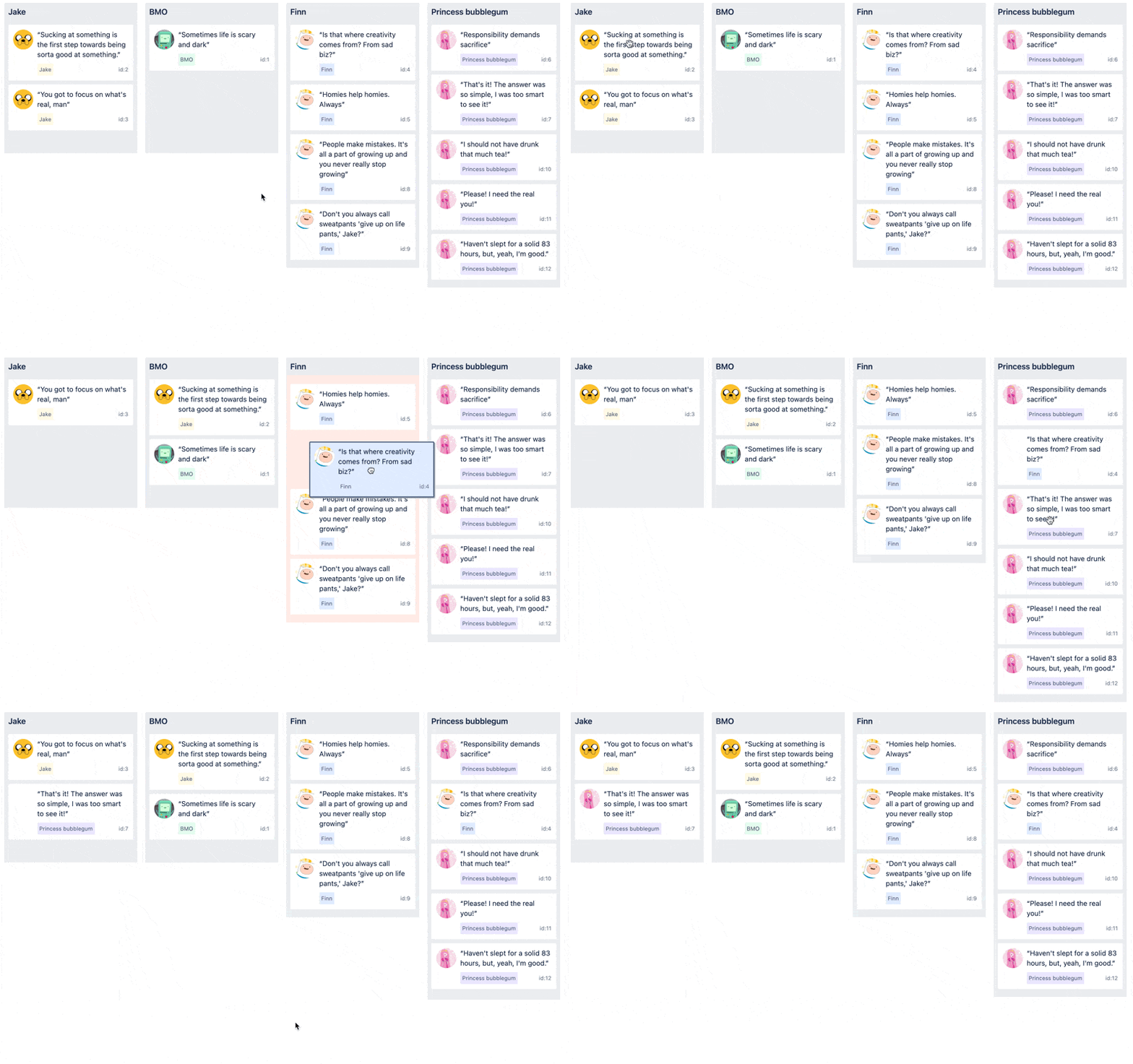

A board interface powered by react-beautiful-dnd

  • Relies on movement to communicate placement
  • Relying on movement works well for lists and lists of lists, but the pattern does not work well for other types of interfaces.
  • This type of pattern can also feel slow at times as you have to wait for animations to finish before parsing the interface and continuing.

[IMG]

Using movement to communicate placement in a tree experience

We can start to feel the limitations of this pattern with structures that are not flat lists. It can be hard to know what a drag operations will do ahead of time in a tree when whitespace is the only indication of change.

Let’s now look at the design language we have gone for with Pragmatic drag and drop:


  • Leverages lines, borders and background color changes to communicate placement.
  • A lack of animations helps makes the interface feel snappy.
  • Works well for almost experience.
  • If a particular experience doesn’t work well with these affordances, then we can create alternatives — with every experience only including that code it needs for that experience.


Using borders, background colors and lines to communicate placement in a tree experience

Lines, borders and background colors lets us have extreme amounts of flexibility in how we communicate what is being achieved.

A great experience for every user

Accessibility has to not just be a consideration but an integral part of any design decision. We have created a robust set of patterns that allow people leveraging assistive technologies to achieve all the same outcomes as a drag and drop operation.


A diagram showing how we think assistive technologies can be used to trigger outcomes

Drag and drop is a visual, pointer-based interaction that not everyone can perform at all times. We spent a long time trying to understand how we could translate this into a delightful and powerful interaction for every user.

In the past, we would have solved this by trying to create a closer relation between pointer-based movements and keyboard interactions, but in research for Pragmatic drag and drop we landed on a different idea that was simple, yet powerful:

Rather than trying to get assistive technologies to perform drag and drop operations, we should enable assistive technologies to achieve the same outcomes in a delightful way.

An outcome could be something like “move this issue from ‘to do’ to ‘in progress’”. Some users might achieve that outcome with a pointer based drag and drop operation, but we can also enable users to achieve the same outcome using controls and flows that are common and friendly for assistive technologies.

One of the main patterns are using to help provide a great experience for assistive technology users is the adding of action menu to draggable entities which includes menu items that allow all movement outcomes to be achieved


An item with a dropdown menu. The dropdown menu contains actions, such as “Move to top” and “Add label”

This approach gives us the flexibility to use different approaches for some experiences, as well as to potentially add a number of different approaches for different types of assistive technologies.

We have created accessibility guidelines and outputs for our makers to help them add accessible outcomes to any experience.

You can benefit from our work as well

We hope you enjoy using Pragmatic drag and drop through our products. We have also released Pragmatic drag and drop as an open source project that you can use it to power drag and drop in your own applications too. You are welcome to use our design guidelines and accessibility guidelines as well, but we have decoupled the behaviour of Pragmatic drag and drop from its design and accessibility outputs, so you can use Pragmatic drag and drop with your own visual language and approach to accessibility.

This article was written by Alex Reardon, Lewis Healey, Melissa JaƩn and Maria Christley.

Jump Hash Sharding Algorithm

Mike's Notes

Google researchers have developed a high-speed sharding algorithm, the Jump Hash Sharding Algorithm, which has been shared with the community. I discovered this in a weekly engineering newsletter from Quastor.

Resources

References

  • Reference

Repository

  • Home > Ajabbi Research > Library >
  • Home > Handbook > 

Last Updated

18/05/2025

How Booking.com Scaled Their Customer Review System

By: 
Quastor: 22/07/2024

Booking.com is one of the largest online travel agencies in the world; they booked over 35 million airplane tickets and a billion hotel room nights through the app/website in 2023.

Whenever you use Booking.com to book a hotel room/flight, you’re prompted to leave a customer review. So far, they have nearly 250 million customer reviews that need to be stored, aggregated and filtered through.

Storing these many reviews on a single machine is not possible due to the size of the data, so Booking.com has partitioned this data across several shards. They also run replicas of each shard for redundancy and have the entire system replicated across several availability zones. They wrote a great blog post on how they do this.

Sharding is done based on a field of the data, called the partition key. For this, Booking.com uses the internal ID of an accommodation. The hotel/property/airline’s internal ID would be used to determine which shard its customer reviews would be stored on.

A basic way of doing this is with the modulo operator.


      Accommodation ID % number of shards = Shard ID
    

If the accommodation internal ID is 10125 and you have 90 shards in the cluster, then customer reviews for that accommodation would go to shard 45 (equal to 10125 % 90).

Challenges with Scaling

The challenge with this sharding scheme comes when you want to add/remove machines to your cluster (change the number of shards).

Booking.com expected a huge boom in users during the summer. They forecasted that they would be seeing some of the highest traffic ever and they needed to come up with a scaling strategy.

However, adding new machines to the cluster will mean rearranging all the data onto new shards.

Let’s go back to our example with internal ID 10125. With 90 shards in our cluster, that accommodation would get mapped to shard 45. If we add 10 shards to our cluster, then that accommodation will now be mapped to shard 25 (equal to 10125 % 100).

This process is called resharding, and it’s quite complex with our current scheme. You have a lot of data being rearranged and you’ll have to deal with issues around ambiguity during the resharding process. Your routing layer won’t know if the 10125 accommodation was already resharded (moved to the new shard) and is now on shard 25 or if it’s still stuck in the processing queue and its data is still located on shard 45.

The solution to this is a family of algorithms called Consistent Hashing. These algorithms minimize the number of keys that need to be remapped when you add/remove shards to the system.

ByteByteGo did a great video on Consistent Hashing (with some awesome visuals), so I’d highly recommend watching that if you’re unfamiliar with the concept. Their explanation was the clearest out of all the videos/articles I read on the topic.

Using the Jump Hash Sharding Algorithm

For their sharding scheme, Booking now uses the Jump Hash Sharding algorithm, a consistent hashing algorithm that was created at Google. It’s extremely fast, takes minimal memory and is simple to implement (can be expressed in 5 lines of code).

With Jump Hash, Booking.com can rely on a property called monotonicity. This property states that when you add new shards to the cluster, data will only move from old shards to new shards; thus there is no unnecessary rearrangement.

With the previous scheme, we had 90 shards at first (labeled shard 1 to 90) and then added 10 new shards (labeled 91 to 100).

Accommodation ID 10125 was getting remapped from shard 45 to shard 25; it was getting moved from one of the old shards in the cluster to another old shard. This data transfer is pointless and doesn’t benefit end users.

What you want is monotonicity, where data is only transferred from shards 1-90 onto the new shards 91 - 100. This data transfer serves a purpose because it balances the load between the old and new shards, so you don’t have hot/cold shards.

The Process for Adding New Shards

Booking.com set a clear process for adding new shards to the cluster.

They provision the new hardware and then have coordinator nodes that figure out which keys will be remapped to the new shards and loads them.

The resharding process begins and the old accommodation IDs are transferred over to the new shards, but the remapped keys are not deleted from the old shards during this process.

This allows the routing layer to ignore the resharding and continue directing traffic to remapped accommodation IDs to the old locations.

Once the resharding process is complete, the routing layer is made aware and it will start directing traffic to the new shards (the remapped accommodation ID locations).

Then, the old shards can be updated to delete the keys that were remapped.

Workflow Description Languages

Mike's Notes

Here are two different workflow languages that I haven't encountered before. I need to test these out because of the Pipi9 Workflow Engine.

Resources

References

  • Reference

Repository

  • Home > Ajabbi Research > Library >
  • Home > Handbook > 

Last Updated

18/05/2025

Article

By: Mike Peters
On a Sandy Beach: 05/08/2024

Mike is the inventor and architect of Pipi and the founder of Ajabbi.

The two languages

  • Common Workflow Language (CWL)
  • Workflow Description Language (WDL)

Common Workflow Language (CWL)

"The Common Workflow Language (CWL) is a standard for describing computational data-analysis workflows.[1] Development of CWL is focused particularly on serving the data-intensive sciences, such as bioinformatics,[2] medical imaging, astronomy, physics, and chemistry.

Standard
A key goal of the CWL is to allow the creation of a workflow that is portable and thus may be run reproducibly in different computational environments.[3]

The CWL originated from discussions in 2014 between Peter Amstutz, John Chilton, NebojÅ”a Tijanić, and Michael R. Crusoe (at that time their respective affiliations were: Galaxy, Arvados, Seven Bridges, and Michigan State University) at the Open Bioinformatics Foundation BOSC 2014 codefest..." - Wikipedia

Workflow Description Language (WDL)

"The Workflow Description Language (WDL) team has announced the release of WDL 1.2.0, a significant update to improve workflow descriptions' flexibility and usability in bioinformatics. This new version introduces several key features and enhancements that promise to streamline workflow management and execution, making it easier for developers and researchers to implement and manage complex bioinformatics workflows.

The Workflow Description Language (WDL) is an open standard specification for describing data processing workflows with a human-readable and writeable syntax. WDL makes defining analysis tasks straightforward, connecting them in workflows and parallelizing their execution. The language strives to be accessible and understandable to all users, including programmers, analysts, and production system operators.

One of the key improvements in WDL 1.2.0 is the introduction of the Directory type. This new type allows workflows to handle directories more effectively, enabling users to pass directories between tasks, which simplifies the management of grouped data files. ..." - infoq

i18n URL

Mike's Notes

Ajabbi will be in multiple languages. What URL structure should be used to organise material in different languages on a website? What do others do?

Resources

  • Resource

References

  • Reference

Repository

  • Home > Ajabbi Research > Library >
  • Home > Handbook > 

Last Updated

18/05/2025

i18n URL

By: Mike Peters
On a Sandy Beach: 04/08/2024

Mike is the inventor and architect of Pipi and the founder of Ajabbi.

wikipedia.org

  • https://en.wikipedia.com/wiki/ccs/

Mozilla MDN

  • https://developer.mozilla.org/en-us/ccs/

ajabbi.com

  • https://ajabbi.com/eng/ccs/

example.com

  • https://en.developer.example.com/ccs/

Options

Subdomains can easily be hosted on separate hosts.

Glottolog - language resource

Mike's Notes

Note

Resources

References

  • Reference

Repository

  • Home > Ajabbi Research > Library >
  • Home > Handbook > 

Last Updated

18/05/2025

Glottolog - language resource

By: Mike Peters
On a Sandy Beach: 03/08/2024

Mike is the inventor and architect of Pipi and the founder of Ajabbi.

"Glottolog is an open-access online bibliographic database of the world's languages. In addition to listing linguistic materials (grammars, articles, dictionaries) describing individual languages, the database also contains the most up-to-date language affiliations based on the work of expert linguists.

Glottolog was first developed and maintained at the Max Planck Institute for Evolutionary Anthropology in Leipzig, Germany, and between 2015 and 2020 at the Max Planck Institute for the Science of Human History in Jena, Germany). Its main curators include Harald Hammarstrƶm and Martin Haspelmath." - Wikipedia

sitemap.xml

Mike's Notes

Once the new Ajabbi websites are ready for the public, they will all need a sitemap file at the web root. As explained in Wikipedia, several formats work, including .xml and .txt.

Resources

References

  • Reference

Repository

  • Home > Ajabbi Research > Library >
  • Home > Handbook > 

Last Updated

18/05/2025

sitemap.xml

By: Mike Peters
On a Sandy Beach: 02/08/2024

Mike is the inventor and architect of Pipi and the founder of Ajabbi.

"Sitemaps is a protocol in XML format meant for a webmaster to inform search engines about URLs on a website that are available for web crawling. It allows webmasters to include additional information about each URL: when it was last updated, how often it changes, and how important it is in relation to other URLs of the site. This allows search engines to crawl the site more efficiently and to find URLs that may be isolated from the rest of the site's content. The Sitemaps protocol is a URL inclusion protocol and complements robots.txt, a URL exclusion protocol." - Wikipedia

"Validating your Sitemap

The following XML schemas define the elements and attributes that can appear in your Sitemap file. You can download this schema from the links below:

There are a number of tools available to help you validate the structure of your Sitemap based on this schema. You can find a list of XML-related tools at each of the following locations:

" - Sitemaps.org

Example

A shortened extract from https://www.thegooddocsproject.dev/sitemap.xml

<urlset xmlns="https://www.sitemaps.org/schemas/sitemap/0.9" xmlns:news="https://www.google.com/schemas/sitemap-news/0.9" xmlns:xhtml="https://www.w3.org/1999/xhtml" xmlns:mobile="https://www.google.com/schemas/sitemap-mobile/1.0" xmlns:image="https://www.google.com/schemas/sitemap-image/1.1" xmlns:video="https://www.google.com/schemas/sitemap-video/1.1">
<url>
  <loc>https://www.thegooddocsproject.dev/</loc>
  <changefreq>monthly</changefreq>
  <priority>0.7</priority>
</url>
<url>
  <loc>https://www.thegooddocsproject.dev/about/</loc>
  <changefreq>monthly</changefreq>
  <priority>0.7</priority>
</url>
<url>
    <loc>https://www.thegooddocsproject.dev/code-of-conduct/</loc>
<changefreq>monthly</changefreq>
  <priority>0.7</priority>
</url>
<url>
  <loc>https://www.thegooddocsproject.dev/blog/keystone-project/</loc>
  <changefreq>yearly</changefreq>
  <priority>0.7</priority>
</url>
<url>
  <loc>https://www.thegooddocsproject.dev/blog/release-brooklyn/</loc>
  <changefreq>yearly</changefreq>
  <priority>0.7</priority>
</url>
</urlset>

Technical Writing

Mike's Notes

I have to write technical documentation, which I'm not great at. I have to use assistive technology, but it's just me until someone else comes along to do it better. So, where to start?

Shamelessly copying what real technical writers do. Use popular templates and frameworks. Write an outline structure and then get ChatGPT to "rewrite it in the following style ...".

Practice and more practice.

Resources

References

  • Reference

Repository

  • Home > Ajabbi Research > Library >
  • Home > Handbook > 

Last Updated

18/05/2025

Technical Writing

By: Mike Peters
On a Sandy Beach: 01/08/2024

Mike is the inventor and architect of Pipi and the founder of Ajabbi.

words

Using Health Terminology Standards

Mike's Notes

Several duplicating international efforts are underway to standardise health Terminology. The health industry applications built on Pipi will first be based on SNOMED CT and then made interoperable with as many other standards as possible using an open API.

These applications will be made freely available on GitHub Repositories.

This situation will change over time as standards change. It would be great for human health if, one day, health systems in every country used one international terminology system.

Ajabbi now has an account with SNOMED CT in NZ.

As Wikipedia describes, these are some of the standards used today and some of the organisations involved.

Resources

References

  • Reference

Repository

  • Home > Ajabbi Research > Library >
  • Home > Handbook > 

Last Updated

17/05/2025

Article

By: Mike Peters
On a Sandy Beach: 31/07/2025

Mike is the inventor and architect of Pipi and the founder of Ajabbi.

words

Rendered by pipi

Mike's Notes

The bottom of each page or file contains a timestamp showing when Pipi rendered it. This is formatted according to the Pipi Render Naming  Convention.

Resources

References

  • Reference

Repository

  • Home > Ajabbi Research > Library >
  • Home > Handbook > 

Last Updated

17/05/2025

Rendered by pipi

By: Mike Peters
On a Sandy Beach: 30/07/2024

Mike is the inventor and architect of Pipi and the founder of Ajabbi.

Structure

  • Rendered:
  • 15:41 UTC, 16 June 2024
  • by Pipi 9.0.2+398

Rendered:

This means the web page or file was automatically created by a machine.

15:41 UTC, 16 June 2024

This is the Date and Time in UTC format.

by pipi 9.0.2+398

This is made up of "Pipi" and after one space "<major version>.<minor version>.<patch>.<build no>" .

Notes

The private pipi core instance name can be added when the platform core uses it.

Examples

Public

Rendered: 15:41 UTC, 16 June 2024 by Pipi 9.0.2+398

Private

Rendered: 15:41 UTC, 16 June 2024 by Pipi Freya 9.0.2+398

Designing a help system with DiƔtaxis

Mike's Notes

This month's job is to design and build a working help system for users. I'm using the DiƔtaxis approach.

Resources

References

  • Reference

Repository

  • Home > Ajabbi Research > Library >
  • Home > Handbook > 

Last Updated

17/05/2025

Designing a help system with DiƔtaxis

By: Mike Peters
On a Sandy Beach: 29/07/2025

Mike is the inventor and architect of Pipi and the founder of Ajabbi.

What is DiƔtaxis?

"The DiƔtaxis approach divides documentation into four distinct content types:

  • Tutorials - Lessons that provide a learning experience, taking users step-by-step through hands-on exercises to build skills and familiarity.
  • How-To Guides - Practical guides focused on providing the steps to solve real-world problems.
  • Reference - Technical descriptions and factual information about the system, APIs, parameters, etc.
  • Explanation - Background information and conceptual discussions that provide context and illuminate topics more broadly.

The key premise of DiƔtaxis is that each content type serves a different user need and has a distinct purpose. Keeping them separated allows the content to be tailored and structured appropriately for that specific goal." - I'd rather be writing Blog

How-To-Guides

"A how-to guide is a recipe that shows the reader how to achieve something.

When the user is getting something done they are at work, applying their knowledge to a real task or problem. Now they need to be shown the key steps to take. What they need is a how-to guide.

Unlike a tutorial, a how-to guide is not responsible for providing a learning experience. It has no obligation to teach. It can assume that the reader has already acquired competence and familiarity with the machinery, its operation, the language used to talk about it and so on. Its obligation is to show a user how to get something done, step-by-step. It’s the obligation of the user to know what they want to get done, and to be able to apply the guide to the needs of their particular situation." - Daniele Procida

Example Outline by Daniele Procida

Overviews and introductory text

The content of a landing page itself should read like an overview.

That is, it should not simply present lists of other content, it should introduce them. Remember that you are always authoring for a human user, not fulfilling the demands of a scheme.

Headings and snippets of introductory text catch the eye and provide context; for example, a how-to landing page:

How to guides
=============

Lorem ipsum dolor sit amet, consectetur adipiscing elit.

Installation guides
-------------------

Pellentesque malesuada, ipsum ac mollis pellentesque, risus
nunc ornare odio, et imperdiet dui mi et dui. Phasellus vel
porta turpis. In feugiat ultricies ipsum.

* Local installation      |
* Docker                        |  links to
* Virtual machines       |  the guides
* Linux containers       |

Deployment and scaling
-----------------------

Morbi sed scelerisque ligula. In dictum lacus quis felis
facilisisvulputate. Quisque lacinia condimentum ipsum
laoreet tempus.

* Deploy an instance        |  links to
* Scale your application   |  the guides

Examples of Help Guides