Everything, everywhere, all at once: Inside the chaos of Alzheimer’s disease

Mike's Notes

This article provides a clear explanation of the brain with Alzheimer's disease. It's also a great example of a complex system.

Resources

References

  • Reference

Repository

  • Home > Ajabbi Research > Library > Subscriptions > The Transmitter
  • Home > Handbook > 

Last Updated

08/07/2025

Everything, everywhere, all at once: Inside the chaos of Alzheimer’s disease

By: Michael Yassa
The Transmitter: 16/06/2025

Michael A. Yassa is professor of neurobiology and behavior and James L. McGaugh Endowed Chair at the University of California, Irvine. His lab has been developing theoretical frameworks and noninvasive brain-imaging tools for understanding memory mechanisms in the human brain and applying this knowledge to human neurological and neuropsychiatric disease.

To truly understand Alzheimer’s disease, we may need to take a systems approach, in which inflammation, vascular injury, impaired glucose metabolism and other factors interact in complex ways.

For nearly three decades, Alzheimer’s disease has been framed as a story about amyloid: A toxic protein builds up, forms plaques, kills neurons and slowly robs people of their memories and identity. The simplicity of this “amyloid cascade hypothesis” gave us targets, tools and a sense of purpose. It felt like a clean story. Almost too clean.

We spent decades chasing it, developing dozens of animal models and pouring billions into anti-amyloid therapies, most of which failed. The few that made it to market offer only modest benefits, often with serious side effects. Whenever I think about this, I can’t help but picture Will Ferrell’s Buddy the Elf, in the movie “Elf,” confronting the mall Santa: “You sit on a throne of lies.” Not because anyone meant to mislead people (though maybe some did). But because we wanted so badly for the story to be true.

So what happened? This should have worked … right?

I would argue it was never going to work because we have been thinking about Alzheimer’s the wrong way. For decades, we have treated it as a single disease with a single straight line from amyloid to dementia. But what if that’s not how it works? What if Alzheimer’s only looks like one disease because we keep trying to force it into a single narrative? If that’s the case, then the search for a single cause—and a single cure—was always destined to fail.

What if Alzheimer’s only looks like one disease because we keep trying to force it into a single narrative? If that’s the case, then the search for a single cause—and a single cure—was always destined to fail.

Real progress, I believe, requires two major shifts in how we think. First, we have to let go of our obsession with amyloid. Now don’t get me wrong. There’s no question amyloid plays a role. It was the first thing Alois Alzheimer saw under the microscope in 1906. And there’s decent evidence that misfolded amyloid spells trouble for the brain. But betting the house on clearing amyloid has been a costly mistake. In fact, we have long known that one-third of people with amyloid pathology do not show any cognitive symptoms, a disconnect that should have forced a rethink years ago.

To the field’s credit, a shift is underway. We’re now exploring other mechanisms—tau, inflammation, metabolic dysfunction, vascular damage, neuronal hyperexcitability and more. But too often, these alternatives are still treated as side plots in an amyloid-centered story. They get less funding, less attention and fewer drug development efforts. That needs to change. These mechanisms may be far more central to the disease than we once thought. And they may drive it differently in different people.

This brings us to the second shift: We need to stop thinking in straight lines. The brain isn’t exactly a flowchart. It’s a dynamical system—a tangled web of feedback loops, compensations and nonlinear interactions. In such systems, small disruptions can ripple outward in unexpected ways. When one part starts to fail, another compensates. Over time, those compensations can become part of the pathology. In some people with Alzheimer’s disease, amyloid might be the trigger. In others, it might be inflammation, vascular injury, impaired glucose metabolism or runaway neural activity. These factors don’t act in isolation—they interact in complex ways, creating a web of multicausal loops. They are less like a chain of dominoes and more like a knot of tangled threads pulling on one another.

In systems terms, it’s not a cascade. It’s a state space. To understand this space, it’s useful to imagine a map in which every possible state of the brain is a point. In this space, healthy brains tend to move within a basin of attraction, a functional stable state. In Alzheimer’s, the brain may be pushed by interacting pathologies into a different region of state space, a pathological attractor—stable but dysfunctional.

There’s growing experimental support for this view. Functional imaging, for example, has shown that people with Alzheimer’s spend more time in sparsely connected, low-flexibility brain states, and MEG recordings reveal changes in the temporal complexity of network dynamics. Recent work in my lab identified a dominant state, characterized by co-activity of nodes in the limbic network, that is linked to worse cognition and Alzheimer’s pathology. The idea is that once the brain tips into the dysfunctional state, it can get stuck there, even if you remove the original trigger.

The idea is that once the brain tips into the dysfunctional state, it can get stuck there, even if you remove the original trigger.

Researchers have already identified a number of “systems-level” factors that can disrupt network stability and contribute to Alzheimer’s disease, including vascular compromise, in which small vessel disease disrupts blood flow and triggers downstream effects; metabolic dysfunction, such as insulin resistance or glucose hypometabolism; runaway inflammation, such as overactive microglia or cytokine chaos; and overactivity, driven by an imbalance in neuronal excitation or inhibition. These factors may represent different systems-level routes to the same clinical outcome. Each person’s condition likely involves a different mix or “weighting” of underlying mechanisms. For someone with a history of diabetes, metabolic dysfunction might be the dominant factor. For someone with high blood pressure, the vascular component could play a bigger role. Ultimately, pinpointing this weighting—the primary mechanism driving the system’s dysfunction, or the mechanistic phenotype—could help match people with the most appropriate treatment.

This framing also changes how we think about treatment. In a system governed by feedback loops and nonlinear dynamics, removing a single trigger may not be sufficient to get the system “unstuck.” That may explain why anti-amyloid drugs haven’t made a major clinical impact: By the time symptoms show up, the system has already reorganized itself. Instead, we may need interventions that restore network stability—rebalancing excitation and inhibition, reducing inflammation or improving metabolic resilience. Noninvasive brain stimulation is one such approach, potentially nudging the system toward a more functional dynamic without needing to target a molecular mechanism. The goal isn’t to fix a part. It’s to shift the conditions that shape how the whole system behaves.

So where is amyloid in all this? Well, amyloid is always present, because our diagnostic criteria make it so. Think of it like background noise—it’s there, but it may not be what’s pushing the system off-key. Unlike the factors described above, amyloid doesn’t consistently drive network-level disruption. It reflects cellular dysfunction, such as misprocessing of amyloid precursor protein or altered lipid metabolism, but the downstream systems-level effects aren’t nearly as consistent or potent as those seen with, say, inflammation or synapse loss. This doesn’t mean addressing amyloid buildup or clearance has no clinical value. It just means it’s likely a small piece in a much larger puzzle. Focusing on it is like trying to fix a whole cacophonous orchestra by tuning but one violin.

Of course, there’s no perfect framework yet. To build it, we’ll need better tools. That includes better ways to capture brain dynamics in vivo, not just static pathology. We also need animal models that go beyond single-gene variants—instead, we need models that combine multiple hits, such as inflammation plus hyperexcitability. And we need ways to track these factors in humans, using multimodal imaging, physiological sensors and inflammatory biomarkers.

Getting there will take work. Paradigm shifts happen slowly, painfully, often after the old model has failed enough times to lose its grip. That’s where we are now. The dominant model isn’t working anymore. What comes next isn’t fully formed—but it’s coming into view. Mechanistic phenotyping and dynamical systems thinking may offer a path forward. It won’t be neat or linear. But it may finally meet the disease on its own terms.

Supporting “Power Users” Isn’t Enough: 3 Complex-App User Types

Mike's Notes

I will implement this excellent advice in future changes to the Pipi UI framework.

Resources

References

  • Reference

Repository

  • Home > Ajabbi Research > Library > Subscriptions > The NN/g Newsletter
  • Home > Handbook > 

Last Updated

07/07/2025

Supporting “Power Users” Isn’t Enough: 3 Complex-App User Types

By: Kate Kaplan
NNGroup: 27/06/2025

Kate Kaplan is Nielsen Norman Group's Insights Architect. She specializes in the application of human-centered design and research practices to enterprise UX challenges. With over 15 years in UX, Kate has extensive experience in both conducting research and helping teams understand and apply user insights to overall business strategy.

Summary:

Complex-app users don’t always fit neatly into “novice” or “expert” labels. Designing for Legacy, Legend, and Learner users leads to more inclusive, effective systems.

When designing complex applications, practitioners often feel pressure to center efforts around “power” users: highly trained professionals with deep domain knowledge and years of experience using the software in question. While these expert users are important, focusing solely on them means overlooking other critical user types.

This tendency reflects a deeper issue: the overly simplistic assumption that complex-app users fall into one of two categories: either novices or experts. In reality, this binary framing fails to account for the users who don't fit cleanly into either category — such as long-term users who never achieved deep system mastery, or domain experts who are new to the software and still learning how to navigate complex workflows. Failing to recognize these nuances results in exclusionary design, inefficient workflows, and missed opportunities to improve user experience.

In This Article:

  • Three Complex Apps User Types
    • 1. The Legacy
    • 2. The Legend
    • 3. The Learner
  • Balancing All Three User Types

Three Complex Apps User Types

To move beyond the novice-expert binary, we need a more nuanced understanding of how people actually engage with complex applications.

Complex applications are systems designed to support specialized workflows, often involving multiple user roles, advanced configurations, and domain-specific operations. 

These tools demand higher levels of cognitive load and feature density compared to typical consumer apps, and they attract a broad range of users whose experience with the software varies widely.

When I coach people to design better complex applications, I highlight three distinct complex-app user profiles whose needs, behaviors, and limitations are often misunderstood or overlooked.

  • The Legacy: The long-term user with deep familiarity but low efficiency
  • The Legend: The power user who has achieved expert-level proficiency
  • The Learner: The domain expert who is new to the software and still building system knowledge

Each of these user types presents distinct design challenges and opportunities that are often overlooked in design decisions and roadmap planning.

1. The Legacy

A legacy user has used the software for years or even decades but hasn’t become truly efficient. Longevity has not translated into true system expertise or understanding. We often mistake legacy users for power users, assuming that frequent and long-term use equates to deep system expertise. However, many of these users continue using the system inefficiently for decades, learning and utilizing only what they need to get by, rather than the system as a whole.

Legacy users often:

  • Use rigid, familiar methods to accomplish tasks
  • Avoid customization and stick to system defaults
  • Use only a narrow slice of the application’s features
  • Develop workarounds (e.g., bookmarks, personal notes, manual processes)

How Legacy Users Are Left Behind

Legacy users are often viewed as resistant to change. The assumption is that they simply don’t want to learn new methods and fear any design modifications, optimizations, or usability improvements. But, in reality, what they often fear is loss of productivity, not change itself. 

Many of these users have adapted to suboptimal workflows over time and are wary of changes that disrupt what little efficiency they have established. 

As one complex-apps practitioner explained, this resistance often stems from deep habits and experience with the existing system:

It wasn't what they were used to. There was that resistance to change. They have great muscle memory. They have great experience. They know workarounds on how to maneuver or how to operate certain things.

These ingrained behaviors can make it difficult for legacy users to recognize inefficiencies or adapt to new workflows, even when those workflows are objectively better designed.

How to Support Legacy Users

Supporting legacy users means recognizing that familiarity doesn’t always equal mastery, and that productivity, not resistance, is often at the heart of their hesitation. The key is to introduce improvements with change-aversion in mind — in a way that feels safe, respectful of their workflows, and clearly beneficial. 

To support legacy users:

  • Avoid sudden, large-scale UI changes that disrupt learned behaviors
  • Communicate upcoming changes early and clearly
  • Provide the option to keep legacy views or workflows during transition periods
  • Offer low-risk beta environments to explore new features
  • Involve them in usability testing and rollout feedback loops
  • Emphasize feature discoverability, especially for time-saving shortcuts

2. The Legend

A legend user is a system expert who has reached a high level of efficiency and fluency within the application. They’ve mastered shortcuts, customized their workflows, and are often deeply embedded in user communities or advisory roles.

We often hear from legend users the most through channels such as forums, beta launches, and customer advisory groups. Their influence can be substantial, and their requests often reflect deep technical understanding and a desire for even greater user control and freedom.

Legends often:

  • Use keyboard shortcuts, macros, and accelerators extensively
  • Advocate for advanced features and customization
  • Desire and request greater flexibility in workflows and outputs
  • Engage heavily in feedback channels, user communities, or advisory boards

How Legend Users Are Left Behind

Legend users introduce two different but significant risks.

First, their feedback may be over-prioritized (either due to their willingness to vocalize their desires or insistence from the business that they are the most “valuable” users). While their input is valuable, over-prioritizing it can skew product decisions toward edge-case, high-effort features that don't benefit the broader user base. This risks bloated features and added complexity for everyone else.

Second, their continued usage of the system is often taken for granted by the business. It's easy to assume that because they’ve mastered the system, they’ll remain loyal. But even legends have limits. When they hit a performance ceiling — or see better, more efficient tools emerge elsewhere — they may abandon the product in search of greater speed, flexibility, or control.

One complex-app practitioner reflected on this competitive pressure from newer, more agile tools:

A lot of other technologies have been innovative and disruptive in the last 15 years. More [companies] have been able to create their own tools and software, and it's like, ‘Wow, you can really get going and do things way faster and easier [with other tools].’

If organizations assume legend users will always stay loyal, they risk overlooking the very real need to continually improve performance and usability for this group.

How to Support Legend Users

Supporting legend users means treating them not just as vocal power users, but as valuable early indicators of system limitations and opportunities. They need continued innovation to stay engaged, and product teams need to listen with discernment, balancing their input with broader user needs.

To support legend users:

  • Don’t assume loyalty; continue to innovate and optimize
  • Conduct regular competitive audits to understand what other tools offer
  • Provide advanced features without compromising core usability
  • Invite legend users into early betas or pilot programs to test high-efficiency features
  • Recognize and celebrate their contributions, but avoid letting their preferences overrule broader design priorities

3. The Learner

The learner is new to the system but not the domain. They bring deep subject-matter expertise but limited familiarity with the system’s workflows, features, and capabilities.

We often assume that learners will simply “figure it out” through training or forced repetition. But without early support, these users may never gain the confidence or fluency needed to use the system effectively. Worse, they may develop workarounds that bypass core features, or disengage entirely due to mistrust in the system.

Learners often:

  • Learn by doing, diving into the interface without any true onboarding
  • Struggle with discovering key functions or the most efficient workflows
  • Lack confidence in whether they are using the system correctly
  • Misunderstand system capabilities or misinterpret outputs due to gaps in system knowledge

How Learners Are Marginalized

Learners are frequently dismissed with the assumption that their struggles are “training issues” — that if they just had more instruction, they’d succeed.

One practitioner summarized the prevailing attitude as:

[Leaders] oftentimes think that it's still the idea of, ‘Well, people go to school to learn how to use our stuff, so we don't really have to worry about that part of the user experience.’

But this mindset shifts the burden of usage from design to users. While training may supplement the learning process, even great training and documentation cannot compensate for poor usability or unintuitive workflows.

If learners aren’t supported during their first encounters with the system, they may never progress to true efficiency or expertise. They will remain dependent, error-prone, and at risk of churning, or worse, transition into Legacy users who never truly master the tool.

How to Support Learners

Supporting learners requires a strong focus on initial usability and progressive learning. It’s about shortening the path from initial usage to proficient usage without relying on a formal training program to bridge the gap.

Consider the following tactics to support this group:

  • Prioritize learnability in design
  • Use inline help, onboarding flows, and just-in-time tips
  • Avoid relying on dense documentation or external training programs
  • Create safe environments (e.g., sandboxes or templates) to encourage low-risk exploration
  • Provide meaningful error messages that include actionable next steps
  • Conduct longitudinal usability testing to observe learning over time

Balancing All Three User Types

Designing successful complex applications means more than choosing whether to support novice or expert users. That question presents a false dichotomy. 

In reality, sustainable product success that delivers on business goals — from long-term user retention to reduced churn and higher satisfaction — requires thoughtful support for all three user types. Each represents a different point on the user journey, and each offers critical insights for improving the system as a whole.

Each group offers unique insights:

  • Learners reveal where onboarding, discoverability, and digital content (including domain-specific language) need improvement
  • Legacies highlight which features remain unwanted, underutilized, or unnecessarily complex
  • Legends surface opportunities for deep feature use, innovation, automation, and long-term efficiency gains

These users should not be treated as static categories. A learner can become a legend — or a legacy — depending on the support they receive and the design choices made over time. Designing for just one of these groups creates long-term risk. Supporting all three builds a more resilient, effective, and loyal user base.

Science vs Māori Knowledge

Mike's Notes

More following on from the discussion raised in the Listener Letter. I agree with Kendall Clements. I support academic freedom and the neutrality of universities.

  • Science is the why
  • Observation is the what

Resources

References

  • Reference

Repository

  • Home > Ajabbi Research > Library > Subscriptions > Quillette Weekly
  • Home > Handbook > 

Last Updated

06/07/2025

Science vs Māori Knowledge

By: Iona Italia
Quillette Weekly: 28/06/2025

Podcast #291

Iona Italia interviews biologist Kendall Clements about New Zealand’s efforts to equate Mātauranga Māori with science in the national curriculum. Clements argues that while traditional Māori knowledge has empirical elements, conflating it with scientific epistemology distorts both systems and undermines academic freedom.

Introduction

I’m your host this week, Iona Italia. My guest today is Kendall Clements, a professor at the University of Auckland who specialises in the ecology and evolution of fish. We talk about attempts in New Zealand to conflate Mātauranga Māori—roughly, traditional Māori knowledge—with science. Kendall explains some of the very different defining features of each of these epistemological systems and argues that conflating the two degrades both of them and is symptomatic of a misunderstanding of one or both. In our wide-ranging conversation, we discuss New Zealand universities, Māori knowledge and traditions, Karl Popper, and the way science works.

If you want to really get into the weeds about the convoluted and absurd scandal in which Kendall was involved after he co-authored a brief letter in defence of science in the Listener magazine in 2021, check out the shownotes on our website version of the podcast at quillette.com, which includes a full transcript of our conversation and some further background reading on that controversy.

Finally, please accept my profound apologies for the way I butcher the pronunciation of Māori terms.

I hope you enjoy my conversation with Kendall Clements.

Next Ajabbi project will use MovieLab ontology

Mike's Notes

I'm starting to map out the shape of the next project. Please note that everything is subject to change as I learn by trial and error. :)

Resources

References

  • Reference

Repository

  • Home > Ajabbi Research > Library > Subject > Film
  • Home > Handbook > 
  • Home > Learn > Docs > Film
  • Home > Wiki > Ontologies > MovieLab

Last Updated

05/07/2025

Next Ajabbi project will use MovieLab ontology

By: Mike Peters
On a Sandy Beach: 05/07/2025

Mike is the inventor and architect of Pipi and the founder of Ajabbi.

Ontology

MovieLab has matured significantly since 2019. The ontology and schema are very easy to follow.

I will use this project to production test Pipi, importing ontologies and automatically generating entities, by using these engines.

  • Ontology Engine (ont)
  • Boro Engine (bor)
  • Entity Engine (ent)

They will also receive full documentation and have UI workspaces.

Art Department

I previously worked in the art department, so I will build that part of the MovieLab schema. I could also test this on an upcoming 40-minute film, currently in pre-production, in which I'm involved.

  • Art Department
    • Hair
    • Wardrobe
    • Props
    • Sets
    • Greenery

From MoveLab

"In the Summer of 2019, MovieLabs, on behalf of its member studios, published a whitepaper called “The Evolution of Media Creation”, which laid out a bold 10-year vision for the adoption of new technologies to aid in content production, post and VFX. The paper, often referred to as the ‘2030 Vision’ has now been broadly adopted by many partner companies and is accepted as the industry ‘north star’ for guiding production technologies towards a shared goal.​

The original Evolution of Media Creation paper, available as a free download, lays out 10 Principles for a more efficient media pipeline using cloud infrastructure, zero trust security and software-defined workflows. The Principles act not just as a destination, but also a roadmap for how to get there. This roadmap drives the work of MovieLabs and those of our studios and external partners as we work together as an industry to bring the promise of the 2030 Vision forward. ​

Although the 2030 Vision is a technology roadmap it’s primary focus is in empowering the creative – to be able to achieve more – to be more efficient (replacing repetitive and menial tasks so they can focus on creative tasks), flexible (so workflows can change and adapt to new situations and technologies) and faster (so there’s more of the most precious resource – time)." - MovieLab


A new website for learning Java!

Mike's Notes

According to the Oracle newsletter, Inside Java - June 2025, a new website is available for beginners learning Java. The new website is helpful for both learning and as an example of how to organise a learning program. I can use this as an example of how to also do this for Pipi 9.

With the planned Pipi 10 migration to BoxLang, using Java directly will become available to the Pipi Dev community.

Here is the navigation outline;

  • Learn Java (beginners)
    • Why Java
    • Learners Corner
      • Getting Setup
      • Learn
      • Practice
      • Apply
      • Other Resources
    • Teachers Corner
      • Curriculum Map
      • Educator Briefings
      • Recruitment & Engagement
      • AP CSA
    • Java Playground
  • Developers (experienced)
    • Learn
    • Download
    • Community
    • Contribute
    • News
    • Future
    • Playground

Resources

References

  • Reference

Repository

  • Home > Ajabbi Research > Library > Subscriptions > Inside Java
  • Home > Handbook > 

Last Updated

04/07/2025

A new website for learning Java!

By: Crystal Sheldon
Inside Java Newsletter: 28/06/2025

A new platform at Learn.java for learners, students, and teachers of Java! And we're looking for contributions!

Whereas the Dev.java platform is excellent at serving the needs of Java professionals, we've recently added Learn.java as a new platform to serve the uniquely different needs of new learners, students, and teachers of Java. It seeks to motivate, inspire, and support the Java education community.

Learn.java motivates the use of Java by answering the question: Why learn Java? This site showcases Java in real life and what it means to be a Java developer. Through learn tutorials, practice exercises, and opportunities to apply with mini-labs, the site inspires learners to engage in Java. The site includes a section dedicated to supporting teachers and curriculum providers, where they can find a curriculum map with lesson plans, an educator briefing on the latest Java updates, and a section dedicated to the needs of AP Computer Science A teachers.

Do you want to contribute and support students and teachers? Please contact me. We are looking for contributors to share their unique stories as Java professionals. Students struggle to understand what it means to be a part of a computer science related field. Your story can inspire them and help them understand the ways Java is used to solve the problems important to them. We hope you will work with us to share your story to help motivate future generations.

Crystal Sheldon

Director, Java in Education, Java Developer Relations

The 2025 DORA survey is open now

Mike's Notes

Note

Resources

References

  • Reference

Repository

  • Home > Ajabbi Research > Library > Subscriptions > IT Revolution
  • Home > Handbook > 

Last Updated

03/07/2025

The 2025 DORA survey is open now

By: 
DORA: Copied 03/07/2025

The DORA research program is dedicated to helping technology teams get better at getting better. That journey often starts with a moment of reflection.

We invite you to take 10 minutes for that reflection with the 2025 DORA Survey. Participants often tell us the survey itself is a valuable self-assessment, sparking immediate ideas for how their team can improve.

Your anonymous contribution will also power the industry’s most trusted research on software delivery performance. This year, we’re exploring crucial topics like AI integration, platform engineering, and developer well-being.

By participating, you:

  • Discover potential improvements for your team just by taking the survey.
  • Shape the industry’s understanding of what defines elite performance in 2025.
  • Help create the benchmark you and your peers will use to drive change.

This research is strongest when it includes diverse perspectives. Whether you’re a Software Engineer, Data Scientist, Product Manager, QA Developer, or anyone else who participates in the creation and delivery of software your voice is critical.

Thank you for helping us all get better at getting better.

Consider holding a team discussion about the survey using our discussion guide.

David Deutsch - What is Truth?

Mike's Notes

This video interview came in the latest issue of Aeon.

Resources

References

  • Reference

Repository

  • Home > Ajabbi Research > Library > Subscriptions > Aeon
  • Home > Ajabbi Research > Library > Subscriptions > Closer to Truth
  • Home > Handbook > Ajabbi Research > Culture

Last Updated

02/07/2025

David Deutsch - What is Truth?
By: Lawrence Kuhn
Closer to Truth: 18/10/2016

David Elieser Deutsch, FRS is a British physicist at the University of Oxford. He is a Visiting Professor in the Department of Atomic and Laser Physics at the Centre for Quantum Computation (CQC) in the Clarendon Laboratory of the University of Oxford.

Deutsch pioneered the field of quantum computation by formulating a description for a quantum Turing machine, as well as specifying an algorithm designed to run on a quantum computer. He is a proponent of the many-worlds interpretation of quantum mechanics.

He was awarded the Dirac Medal and Prize of the International Centre for Theoretical Physics in 2017, the Isaac Newton Medal and Prize of the Institute of Physics in 2021, and the Breakthrough Prize in Fundamental Physics in 2022. His popular books The Fabric of Reality and The Beginning of Infinity have each been translated into 12 languages.

Why David Deutsch believes good explanations are the antidote to bad philosophy

In this interview from the long-running series Closer to Truth, the British theoretical physicist and philosopher David Deutsch makes the case that understanding the difference between good and bad explanations is central to advancing knowledge. In conversation with the US presenter Robert Lawrence Kuhn, Deutsch outlines what he believes makes for a convincing explanation – primarily, unprejudiced thinking, relevance and specificity. Further, he argues that this framework for explanations is a vital corrective to a century in which what he calls ‘bad philosophy’, including logical positivism, has dominated, constraining the search for good ideas.

Thinking about the next steps ahead

Mike's Notes

I had the regular meeting on Sunday night, which helped bounce ideas around. I would like to know what people think of what I have written. Just contact me for a chat.

Resources

References

  • Reference

Repository

  • Home > Ajabbi Research > Library >
  • Home > Handbook > 

Last Updated

09/07/2025

Thinking about the next steps ahead

By: Mike Peters
On a Sandy Beach: 01/07/2025

Mike is the inventor and architect of Pipi and the founder of Ajabbi.

Ajabbi uses Pipi 9 to run on, known as "dogfooding". Steady progress is being made with Pipi 9, and the first customer website, which is now well underway.

The customer's website required several reusable modules and utilises these engines and more.

  • Website Engine
  • Reference Engine
  • i18n Engine
  • Reference Engine

Documentation of these modules and engines is now required for developers and administrators.

Next Project

It was now time to determine a plan for the next project.

There are three options;

  • Finish the developer documentation
  • Complete the user workspace roadmap
  • Build a simple SaaS application

I will go into some detail about each option.

Finish the developer documentation.

No developer will be able to build anything with Pipi unless they have some documentation on how it works. 5% is documented.

Complete the user workspace roadmap.

This will enable users to log in and use the available features, but they will still require instructions in the form of documentation.

Build a simple SaaS application.

The Movie Industry SaaS application is straightforward and utilises a compact ontology. Its ontology is over 1,000 times smaller than SNOMED, so it's an easy place to start. It would be a way to test the Ontology API and Boro engines. It builds some more reusable modules. It also provides a helpful tool that people can use for their work.

This would generate more learning opportunities for me, as I do this work by the seat of my pants.

Discussion

The advantage of building a simple SaaS application is that it requires a user workspace and some relevant documentation. 

Being product-led, would only schedule work on any necessary background systems and documentation. It also makes things more manageable as Pipi slowly scales.

Over time, more modules will be completed, more engines will be documented, and the user workspace will expand.

Show and tell

Embedding short YouTube video recordings demonstrating workspace usage could be incorporated into training and contextual help documentation.

A longer, prerecorded technical demonstration video, accompanied by slides and a PDF white paper, could then be shared with the Ontolog Forum to solicit critical feedback. I suspect they would be curious about a novel use of Ontology technology as part of constraints in State Space.

Psychological Safety vs. High Standards: A Misunderstood Dynamic

Mike's Notes

This is an interesting take on learning from making mistakes. I make lots of errors because I try new things, always learn from them, and never repeat the same mistakes.

The main lesson here.

"Psychological safety and high standards are complementary, not contradictory."

Leadership is a fascinating subject. Many "leaders" I have seen in big companies act like psychopaths. And don't get me started on politicians of all stripes .......

I read the book Elon Musk (2023) by Isaacson. Musk is clearly a genius, but there is never an excuse to behave like an arsehole.

Resources

References

  1. Isaacson, W. (2023). Elon Musk.
  2. Edmondson, A. C. (2024). Interview. In Harvard Business Review, Psychological Safety (Emotional Intelligence Series).
  3. Edmondson, A. C. (2012). Teaming.
  4. Edmondson, A. C. (2018). The Fearless Organization.
  5. Edmondson, A. C. (2023). Right Kind of Wrong.
  6. Collins, J. (2020). Beyond Entrepreneurship 2.0.
  7. Argyris, C., & Schon, D. A. (1974). Theory in practice: Increasing professional effectiveness. 
  8. Duhigg, C. (2016). What Google Learned From Its Quest to Build the Perfect Team.
  9. Edmondson, A. C., & Lei, Z. (2014). Psychological Safety: The History, Renaissance, and Future of an Interpersonal Construct.
  10. Edmondson, A. (1999). Psychological Safety and Learning Behavior in Work Teams.

Repository

  • Home > Ajabbi Research > Library >
  • Home > Handbook > 

Last Updated

01/06/2025

Psychological Safety vs. High Standards: A Misunderstood Dynamic

By: Sheril Mathews
Leading Sapiens: 17/10/2024

The term “psychological safety” is often misleading. When managers hear safety, many dismiss it as a soft style that implies complacency. Meanwhile, psychology implies too much mumbo jumbo. High-profile figures like Elon Musk advocating for a “hardcore” style perpetuate this misconception. But this is a fundamental misunderstanding of the relationship between high standards and psychological safety.

In this piece, I unpack the confusion surrounding psychological safety and why you need both psychological safety and high standards to achieve high performance.

In his biography of Elon Musk, Walter Isaacson cites an exchange that’s telling. The backdrop is the initial days after Musk took over Twitter.

Between Twitterland and the Muskverse was a radical divergence in outlook that reflected two different mindsets about the American workplace. Twitter prided itself on being a friendly place where coddling was considered a virtue. “We were definitely very high-empathy, very caring about inclusion and diversity; everyone needs to feel safe here,” says Leslie Berland, who was chief marketing and people officer until she was fired by Musk. The company had instituted a permanent work-from-home option and allowed a mental “day of rest” each month. One of the commonly used buzzwords at the company was “psychological safety.” Care was taken not to discomfort.

Musk let loose a bitter laugh when he heard the phrase “psychological safety.” It made him recoil. He considered it to be the enemy of urgency, progress, orbital velocity. His preferred buzzword was “hardcore.” Discomfort, he believed, was a good thing. It was a weapon against the scourge of complacency. Vacations, flower-smelling, work-life balance, and days of “mental rest” were not his thing. Let that sink in.

Musk had wrought one of the greatest shifts in corporate culture ever. Twitter had gone from being among the most nurturing workplaces, replete with free artisanal meals and yoga studios and paid rest days and concern for “psychological safety,” to the other extreme. He did it not only for cost reasons. He preferred a scrappy, hard-driven environment where rabid warriors felt psychological danger rather than comfort. [1]

Amy Edmondson of Harvard, the leading researcher in psychological safety, defines it as the belief that you won't be punished or humiliated for speaking up with ideas, questions, concerns, or mistakes. It encourages intelligent risk-taking by reducing interpersonal anxiety.

Hundreds of studies, including Google’s Project Aristotle, show that psychological safety is essential for high performance in the modern workplace. Given its importance, you’d think managers would actively work to enable it.

Yet, in practice, these findings often fall on deaf ears. Why is this so?

In my experience, there are two main confusions that muddle the message: “comfort” and “safe spaces.” Let’s examine the two.

Psychological safety is not “comfort”

In Isaacson’s exchange, psychological safety is conflated with “coddling” and “not to discomfort”. Meanwhile, “hardcore” is considered the opposite. The implied message? "Psych safety is for losers; we are hardcore here".

Musk's disdain for the term "safety" stems from its association with a lack of urgency, complacency, and laziness. For him, discomfort drives productivity, where fear and stress combat complacency and push people toward "orbital velocity."

From his perspective, psychological safety is the opposite of high performance. It hinders accountability and the "hardcore" mindset required for rapid innovation. Comfort is anathema to performance, and psychological safety is about free artisanal meals and a lax work attitude.

Musk isn’t alone in making this mistake. As a manager, when I myself came across the concept in 2018 I dismissed it as “soft” and another management fad destined to die.

Edmondson herself acknowledges the problem with terminology:

The term implies to people a sense of coziness — “Oh, everything’s going to be great” — and that we’re all going to be nice to each other. That’s not what it’s really about. It’s about candor, about being direct, taking risks, and being willing to say, “I screwed that up.” It’s being willing to ask for help when you’re in over your head. [2]

Maybe that’s why she called her 2018 book “Fearless Organization” instead of “The Psychologically Safe Organization.”

She clarifies:

Psychological safety is not an “anything goes” environment where people are not expected to adhere to high standards or meet deadlines. It is not about becoming “comfortable” at work.

This is particularly important to understand because many managers appreciate the appeal of error-reporting, help-seeking, and other proactive behavior to help their organizations learn. At the same time, they implicitly equate psychological safety with relaxing performance standards – that is, with an inability to, in their words, “hold people accountable.” This conveys a misunderstanding of the nature of the phenomenon. [4]

Psychological Safety is not about comfort.

Such a climate does not, however, deny failure and whitewash poor results but examines them to see how they can be eliminated or reduced. The reinforcement that comes initially from others and later from oneself is the knowledge that one has made a genuine attempt and that failure occurred only because one's goals were beyond one's current abilities. Failure to perform beyond one's limits is not the same as failure to perform what one is capable of performing. 

— Chris Argyris, Donald Schon, Theory in Practice

Let’s look at the next culprit.

It’s not about “safe spaces” either

Another term that adds to the confusion is 'safe spaces.' Although sounding similar, they serve different purposes and come from different contexts. Even experienced practitioners get these two mixed up.

Safe spaces originated in social movements and are designed to be environments free of conflict. They're found in educational settings or communities dealing with sensitive issues, where the goal is to protect individuals from potentially harmful situations. Discomfort is intentionally minimized, and clear boundaries are set from the outset.

Meanwhile, psychological safety emerged in the context of organizations and team dynamics. It focuses on creating environments where people feel safe to speak up, make mistakes, and take risks, especially in challenging, high-stakes situations.

Unlike safe spaces, psychological safety doesn't aim to eliminate discomfort. Instead, it ensures discomfort is productive — an essential part of learning and growth.

Safe spaces are about protection from external judgment by removing threats or negative stimuli. In contrast, psychological safety encourages risk-taking for group performance and learning.

This distinction is crucial. Equating psychological safety with safe spaces creates the misconception that it means avoiding accountability or difficult feedback. In reality, it is compatible with high standards and challenging expectations.

The role of leadership also differs. In safe spaces, leaders act as guardians, setting and enforcing norms to protect members. In psychologically safe workplaces, they model fallibility, ensure open dialogue, practice humble inquiry, and frame failures as learning opportunities.

A psychologically safe workplace isn't devoid of challenge or discomfort; it ensures that discomfort is generative, not destructive.

What Psychological Safety really is

Psychological safety isn't about avoiding discomfort; it's about ensuring that discomfort — what Musk calls "hardcore"— fosters growth, intelligent risk-taking, and learning. He is half-right: there's no growth without discomfort. But for people to embrace it productively, you need psychological safety. This means creating an environment where people feel secure enough to fully engage, experiment, make mistakes, and challenge themselves and their leaders.

Contrary to misconceptions, psychological safety enables — not hinders — the "discomfort" and "hardcore" approach that Musk advocates. It's not about removing accountability or avoiding challenges, but supporting people to confidently face them head-on.

To use one of Edmondson's analogies: psychological safety is like removing the brakes that keep a car from moving, while high standards act as the steering mechanism. Without it, even with high standards, you risk chaos—team members may be too afraid to accelerate, or if they do, they might crash due to uncertainty.

While discomfort is indeed a powerful catalyst, it's an error to assume stress and fear are the only ways to generate urgency. High standards are most effective when people feel supported in reaching them. Without psychological safety, innovation suffers as people avoid exposing their vulnerabilities or lack of skills, fearing ridicule and punishment.

High-performance teams understand that excellence requires iterative failures. They don't demand perfection; instead, they encourage trial, error, and adjustment. In this environment, failure isn't just tolerated; it's an integral part of the process.

Expectations remain high, and people work hard. However, the crucial difference is that it's safe to fail and learn, driving both individual and organizational growth.

The 4 organizational archetypes

Elon Musk's management of Twitter is an extreme example of coercive power. He let go 75% of the workforce to ensure only the "hardcore" survived. The idea was that discomfort would push the remaining employees to innovate and execute faster, which, to some extent, did happen. Twitter continued to operate, albeit in a diminished form, and introduced new features with a much smaller staff.

High pressure and discomfort can indeed lead to bursts of productivity, especially in a crisis where the stakes are high and the need for immediate action is clear. However, sustained pressure without psychological safety leads to burnout, reduced creativity, and reluctance to take risks. People focus on avoiding failure rather than striving for excellence. This anxiety undermines the creativity that companies like Twitter need to thrive.

This interplay between high standards and psychological safety is depicted by Edmondson’s 4 organizational archetypes:

Psychological safety and high standards.

High Safety, Low Standards (Comfort Zone)

This is the version of psychological safety Musk imagined — one where no one is pushed to excel. Teams enjoy a collegial atmosphere and are comfortable but lack challenge.

While this might seem pleasant on the surface, it's not conducive to learning, innovation, or high engagement. Without a compelling reason to push boundaries, teams don't grow or achieve significant results.

It’s a breeding ground for complacency. There’s a lack of healthy conflict or debate, with people agreeing too readily to maintain the status quo. Without a pressing need to improve or take risks, innovation stagnates. The desire for harmony overrides critical thinking, leading to groupthink. This results in a decline in competitive edge and market relevance.

Low Safety, High Standards (Anxiety Zone)

This quadrant epitomizes Musk's "hardcore" management. It's a common pitfall in modern workplaces, where leaders demand excellence but fail to cultivate psychological safety. The result is an anxiety-inducing environment that undermines the very performance it seeks to enhance.

There’s often a veneer of productivity masking deeper issues. Teams may seem to be highly productive, but there's increasing signs of burnout – absenteeism, declining work quality, and a blame culture. Information is hoarded for job security instead of shared for collective benefit.

Teams retreat to the status quo, paralyzed by the fear of failure. Crucial questions remain unvoiced, stifling quality and ingenuity. The organization inadvertently cultivates a risk-averse workforce, favoring "safe" decisions over potentially transformative ones.

People work hard, but primarily out of fear. While it may yield short-term results, it limits an organization's capacity for breakthroughs and sustained growth.

High Safety, High Standards (Learning Zone)

This is the sweet spot where psychological safety and high standards coexist. In this quadrant, people feel empowered to take calculated risks, voice unconventional ideas, and own up to mistakes without fear of repercussions.

It balances both comfort and challenge. Ideas are challenged respectfully, regardless of the source. Feedback flows freely and constructively in all directions, regardless of hierarchy. Teams feel secure enough to push boundaries and tackle complex problems, knowing they have support.

Failures aren't career-ending; they're viewed as learning opportunities. Cross-functional collaboration happens organically, as people seek diverse viewpoints to solve problems. Innovation thrives because people feel safe to experiment. They're not paralyzed by fear of failure but energized by the possibility of breakthrough. This creates a dynamic, engaged workforce pushing the envelope.

Low Safety, Low Standards (Apathy Zone)

Without safety or standards, people do the bare minimum to stay employed. Team members may engage in “presenteeism” or “quiet quitting” - showing up physically but not mentally. They likely prioritize self-protection over extra effort, leading to unproductive behaviors and conflicts. This is common in large, bureaucratic organizations where people have figured out how to do their jobs with minimal effort.

In these places, mediocrity takes root along with passive-aggressive behavior, office politics, and a lack of initiative. There’s also high turnover rates and strong resistance to change.

People develop learned helplessness, believing their efforts won't matter. It creates a destructive cycle where low expectations lead to low performance, reinforcing apathy.

The paradox of “hard” and “soft”

Psychological safety and accountability are not two ends of a continuum, but rather two distinct attributes of a work environment. [3]

The dichotomy of either psychological safety or high standards is a classic case of “either/or” thinking. Effective leadership requires an “and” approach: integrating both psychological safety and high standards to create places where people can take risks and be challenged simultaneously.

A culture that makes it safe to talk about failure can coexist with high standards… This is as true in families as it is at work. Psychological safety isn’t synonymous with “anything goes.”

A workplace can be psychologically safe and still expect people to do excellent work or meet deadlines. A family can be psychologically safe and still expect everyone to wash dishes and take out the trash. It’s possible to create an environment where candor and openness seem feasible: an honest, challenging, collaborative environment. I’d go so far as to say that insisting on high standards without psychological safety is a recipe for failure— and not the good kind. [5]

Psychological safety and high standards are complementary, not contradictory. The job of leadership is to both challenge and support. It allows people to fully commit to high standards because they trust they won't be penalized for mistakes or deviations during the learning process.

Jim Collins calls this leadership dynamic “the paradox of hard and soft”:

A good leader doesn’t demand high performance (demanding implies that people are basically lazy and are inclined to withhold their best effort—that it must be extracted out of them, like pulling teeth). No, a good leader offers people the opportunity to test themselves, to grow, and to do their best work.

There is no shortage of people interested in doing something in which they can take pride. But there is a vast shortage of leaders who provide the stimulation of stiff challenge and high standards, combined with the uncompromising belief that seemingly ordinary people can do extraordinary things.

Leaders who build great companies master the paradox of hard and soft. They hold people to incredibly high standards of performance (hard) yet they go to great lengths to build people up—to make them feel good about themselves and about what they are capable of achieving (soft). [6]

As leaders, the challenge is to create an environment for team members feel secure enough while pushing to meet ambitious goals. It's not about implementing policies, but about modeling and reinforcing behaviors that support both safety and excellence.

Pay attention to subtle indicators. Are team members engaging in candid discussions about failures? Do they proactively seek feedback? These signs can help you gauge if you're in a "Learning Zone" or "Anxiety Zone".

The goal isn't to eliminate discomfort, but to ensure it serves a productive purpose. Mastering this balance sets the stage for excellence.

How Databases Store Your Tables on Disk

Mike's Notes

Fascinating article, especially the storage differences between Postgres and InnoDB.

Resources

References

  • Reference

Repository

  • Home > Ajabbi Research > Library > Subscriptions > DeepIntoDev
  • Home > Handbook > 

Last Updated

29/06/2025

How Databases Store Your Tables on Disk

By: 
DeepIntoDev: 25/05/2025

After you complete this article, you will have a solid understanding of:

  • How is a table you create in a database stored behind the scenes?
  • What are pages and heap files, and how do they work?
  • What are indexes and clustered indexes, and how do they provide optimization?
  • How do databases work internally?

When you're building a project and set up a database, creating a table with rows and columns feels pretty straightforward. You define the structure, add some data, and it just works. But have you ever stopped to think about what’s actually going on under the hood? How does your computer store all that information behind the scenes?

After all, computers don’t really “know” what a table is, they only deal with 0s and 1s. So how do they take that nicely structured data and translate it into something they can work with?

If you’ve ever created a database and found yourself wondering how rows, columns, and individual cells are really stored in memory, then you’re in the right place. In this article, we will break it all down in a way that’s easy to follow.

Along the way, we’ll also explore some key concepts (Heap file, Index, Clustered Index…) from the world of databases, either you’ll learn something new, or you’ll get a clearer understanding of stuff you might’ve already heard of.

First, let’s start by clearing up some concepts. These concepts are essential to truly understand what’s really happening behind the scenes when it comes to storing your database in a computer’s memory.

A table in PostgreSQL

So basically, in a table, we have rows and columns. The photo shown above has rows and columns defined by us.

But in some popular databases, there’s also a column that’s hidden from us. For example, databases like PostgreSQL have a system column called row_id (tuple_id,ctid). So databases create their own internal system to track your table’s rows.

A table with tuple_id in PostgreSQL

Note: A tuple ID is a pair (block number, tuple index within block) that identifies the physical location of the row within its table. (From postgresql documentation)

But not all databases handle things the same way.

For example, in InnoDB (MySQL's default storage engine);

If the table has a PRIMARY KEY, InnoDB uses the PRIMARY KEY as the row ID.

In this case, the data is physically stored on disk in the order of the PRIMARY KEY (as a clustered index -you will learn what a clustered index in this blog later-). No additional internal row ID is created, the PRIMARY KEY is sufficient to uniquely and physically identify each row.

So if there is primary key: PRIMARY KEY = Internal row ID.

If the table does NOT have a PRIMARY KEY, InnoDB automatically creates a hidden 6-byte row ID (an internal integer column). This hidden column is not visible to the user, but it is assigned to every row. This internal row ID is used to uniquely identify and reference rows internally.

If there is no PRIMARY KEY or even a UNIQUE key, this internal ID becomes essential for performance and referencing.

So If there’s no PRIMARY KEY: InnoDB creates a hidden internal row ID.

This row_id concept is important to know because as we go further, we’ll see actual use cases of these row IDs.

Alright, so now our database has a way to uniquely identify each row, whether through a primary key or a hidden internal ID. That means we’re ready to start thinking about how all this data actually gets stored in memory.

Pages

Okay, now we have a logical table with rows and columns. But how is it actually stored on disk? Obviously, our disk doesn’t store this table as a “table” - it doesn’t even know what a table is.

Depending on the storage model (row vs. column storage), the rows are stored and read in logical pages.

If you don’t know what a storage model is, I’ll briefly interrupt your reading to explain it.

Storage model means that how data is physically stored.

Row Store (Row-based storage)

  • This is the most classic and widely used storage model. (Used in systems like MySQL InnoDB, PostgreSQL, etc.)
  • In a row store, all the column values for a single row are stored together. Example:

Row 1: [id=1, name="Ali", age=25]
Row 2: [id=2, name="Ayşe", age=30]

Advantage: Very fast for row-based queries (like SELECT * FROM table)

Column Store (Column-based storage)

Here, data is stored by columns instead of rows. Example (physically stored):

Column id:   [1, 2]
Column name: ["Ali", "Ayşe"]
Column age:  [25, 30]

Advantage: Much faster for analytical queries (like SELECT AVG(age)) because only the needed columns are read.

Examples of column store systems: Amazon Redshift, ClickHouse, Apache Parquet files, Google BigQuery, Apache Cassandra (partially).

Now you know what a storage model means. So let’s get back to pages. What does a logical page actually mean?

A page is basically a fixed-size block of data, either in memory or on disk.

Databases don’t read a single row; instead, they read a page or more in a single I/O, giving us many rows at once. RAM (as the name says, Random Access Memory) allows direct access to any specific memory address, enabling efficient reading of small or individual data blocks. On the other hand, disk storage reads and writes data in fixed-size pages, not individual bytes.

The database allocates a pool of memory, often called buffer pool. Pages read from disk are placed in the buffer pool.

Once a page is loaded into the buffer pool, you don’t just get the specific row you asked for, you also get all the other rows stored on that same page. So depending on how much space each row takes up, you might end up with several useful rows already in memory, basically for free.

This makes reading data much more efficient, especially when doing index range scans. If the rows are small, more of them can fit into a single page. That means each time we read a page from disk, we get more useful data out of it, making every I/O operation more valuable.

The same goes for writes, when a user updates a row, the database finds the page where the row lives, pull the page in the buffer pool and update the row in memory and make a journal entry of the change (often called WAL) persisted to disk. The page can remain in memory so it may receive more writes before it is finally flushed back to disk, minimizing the number of I/Os. Deletes and inserts work the same but implementation may vary.

Note: What is WAL? When a user updates data, the database doesn’t write the change to the data file immediately. Instead, it first records the change in a special log file called the Write-Ahead Log (WAL), also known as the journal. This log is written to disk right away, ensuring the change isn’t lost if the system crashes. Later, the actual data file is updated based on the WAL entry.

Each page usually has a fixed size depending on which database you’re using (for example, 8KB in PostgreSQL, 16KB in MySQL…)

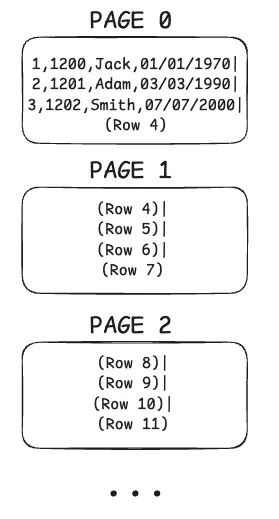
Let’s assume each page holds 4 rows, and we have a table with 1000 rows. That means we will have a total of 250 pages storing our rows.

Page 0 → holds the first 4 rows, Page 1 → holds rows 5-8, and so on…

Pages in Disk
(This photo is a simplified example of a pages in row-based storage databases.)

So, in short, a database stores its data in small, fixed-size pieces called pages.

Understanding pages is really important because they are the fundamental factor that can make your queries slow or fast.

Earlier, we said the database doesn’t read a single row; instead, it reads a page or more in a single I/O, giving us many rows at once. But what does I/O really mean in this specific context?

When we say an I/O (Input/Output) operation, we’re talking about any interaction with the disk, whether it’s reading data or writing it. We try to minimize these as much as possible, the fewer I/Os we make, the faster our queries run. An I/O can fetch one page or more, depending on disk partitions and other factors.

Like we said before, an I/O can’t read a single row; it reads a whole page with many rows in it, so basically, we get a lot of rows for free.

But I/O doesn’t always mean going all the way to the disk. Some I/Os interact with the operating system’s cache, which definitely makes your queries faster.

Heap

From now on, we’ll also talk about the “heap” (which usually refers to a heap file). So let’s quickly introduce what that means.

Actually, the heap is exactly what we’ve talked about so far. It’s a data structure where the table’s pages are stored one after another. This is where the actual data lives. Everything in the table is in the heap.

In a heap, pages aren’t stored in any particular order. Data gets placed wherever there’s space, so pages can be scattered and unordered. This means searching through a heap usually means scanning the entire table. (If you use a clustered index, pages are stored in a sorted, organized way based on the index key. You’ll learn what a clustered index is later in this blog.)

So basically,

Heap File → Contains Pages,

Page → Contains Records(rows)

Traversing the heap is an expensive operation since it contains everything. That’s why we need some kind of logic to help us find exactly which page we’re interested in, in other words, which page holds the data we’re looking for. That’s where indexes come in. Indexes help us to tell exactly what part of the heap we need to read, or in other words, which page(s) of the heap to pull.

If we know exactly what page to pull to get what we want, the operation becomes much less expensive, as you can probably guess. But how do we actually do that?

Index

An index is just another data structure - usually a B-Tree - separate from the heap that holds pointers to the heap. So indexes aren’t stored in the heap itself, but in their own structure, pointing to the actual data in the heap.

An index contains parts of the data and is used to quickly search for something. You can create an index on one column or multiple columns.

Indexes tell us EXACTLY which page to fetch from the heap, instead of scanning every page and taking a big performance hit.

But indexes aren’t a magical thing, they’re also stored as pages and require I/O to read their entries. So we need to be careful with indexes. The smaller the index, the more of it can fit in memory, and the faster the search will be.

Now, let’s do a simplified example so you can fully understand what an index really is.

Let’s say we’ve indexed the person_id column in our table. (If you forgot how our table looked, check the first photo.)

So, in the heap section, we have pages, right?

Pages in Disk

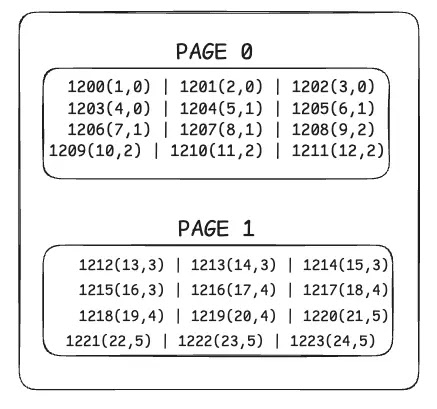
Since we indexed the person_id column, now there’s another data structure that holds the index information, not in the heap, but somewhere else. (The image below isn’t a B-Tree, we don’t store indexes sequentially like in the photo, but it’s meant to help you get the idea. In the real world, indexes are usually stored in B-Trees.)

After indexing person_id, outside the heap file, we have another data structure now;

Indexes in Disk

Here, since we indexed the person_id, we store the value of person_id for each row. Along with this value, we also keep information about where to find that row. For example, for employee_id 1200, we know it has a row_id of 1 and lives on page 0.

For employee_id 1204, we know it has a row_id of 5 and is on page 1.

So basically, these numbers mean → employee_id (row_id, which page the row lives on).

The row_id and page info act as the pointers we talked about earlier, directing us to the right spot in the heap section.

Let’s say we want to get the name for person_id 1202. First, we make an I/O request to the index page to find the exact location of that person in the heap. Now that we know the exact location, we make another I/O request to the heap, for example, “give me page 0 and row_id 3.” (We’ll actually pull all the rows in page 0 too, since we can’t read a single row alone, but we only use the data with row_id 3.)

Like I mentioned before, indexes aren’t stored sequentially like in the simple example, they’re stored in a much more efficient structure. So with the right setup, making an I/O request to the index page and finding the correct person_id is very fast, thanks to B-Trees.

Clustered Index

There is also something called a clustered index, which I’ve mentioned earlier in this article. Since it can be really helpful sometimes, I want to explain a bit more about clustered indexes. Like we said before, normally a heap table stores data in no particular order. But if you create a clustered index on a column, the table’s data will be physically organized based on that index.

As you might guess, a table can have only one clustered index because the data can be physically sorted in only one way.

Let's consider a table: Users(id, name, age)

  • If this table has no indexes, it is called a heap table. (like we said earlier.)
  • If we create a clustered index on the id column:
  • The table is now physically sorted based on the id column.
  • The database stores the data according to this order.
  • This makes queries like WHERE id = 100 much faster.
  • And in some databases, like InnoDB, every table is actually stored as a clustered index structure as default.

This is because InnoDB physically sorts and stores the data based on the table’s primary key.

If the table has a PRIMARY KEY, InnoDB creates the clustered index on that column, and the data is organized according to that order.

If the table does not have a PRIMARY KEY, InnoDB automatically creates a hidden clustered index, usually based on a unique row ID generated internally in the order the rows were inserted.

So, every table in InnoDB always has a clustered index.

This is actually very important to understand. Let’s say you’re using InnoDB and you have a completely random value like a UUID as the primary key of your table.

Believe it or not, this can seriously hurt your performance. Why? Because since a UUID is completely random, each new row gets inserted somewhere in the middle or a random place in the table. This causes InnoDB to constantly reorganize data, leading to page splits and fragmentation.

As a result, disk and memory accesses increase, and both write and read performance degrade.

So, if you must use UUIDs, it’s better to use them as a non-clustered index, not as the PRIMARY KEY.

For the PRIMARY KEY, using auto-increment integer values is usually better because inserts happen at the end of the table, reducing the need for reorganization.

In InnoDB, other indexes (secondary indexes) do not point directly to the row data, but instead point to the primary key of that row.

In other words:

Secondary index → primary key value → actual row data.

Note: The term "other indexes" refers to the indexes you create using CREATE INDEX or by defining a column as UNIQUE or INDEX.

Example:

CREATE INDEX idx_name ON users(name);

Here, idx_name becomes a secondary index, and InnoDB uses this index to find the primary key value first, then accesses the actual row using that primary key.

But in Postgres, everything is actually a secondary index. Remember, we have row_id (or tuple_id, ctid) in Postgres. All indexes point directly to the row_id which lives in the heap.

So, indexes show row_ids, and row_ids show the exact location of the row.

But there is also an important thing you should know. This might be a bit off-topic for this article, but if you’re a curious and want to research more about database implementations, you can keep reading. After that, you can do your own research on this topic.

ANY update in Postgres will update all the indexes corresponding to that table. Why? Because when you make an update in Postgres, you actually do a DELETE + INSERT. So you create a new row with a different tuple_id. And all the indexes, since they point to that tuple_id, have to know about this new tuple_id, which is why they need to get updated.

Why did I say that when you make an update, you actually do a delete + insert though?

PostgreSQL does not update a table row in place. Rather, it writes a new version of the row (the PostgreSQL term for a row version is “tuple”) and leaves the old row version in place to serve concurrent read requests. VACUUM later removes these “dead tuples”.

If you delete a row and insert a new one, the effect is similar: we have one dead tuple and one new live tuple. This is why people say that “an UPDATE in PostgreSQL is almost the same as a DELETE, followed by an INSERT

Why? Because PostgreSQL uses an MVCC (Multi-Version Concurrency Control) architecture. MVCC allows multiple transactions to read and write data concurrently in a consistent and non-conflicting way by keeping old and new versions of rows. If you’re curious, you can continue researching this topic further. I’m not going into the details here to avoid going too far off the main subject of this article.

I hope after reading this article, you have gained some insight into how databases work internally.